# Storage and costs

### Non-sensitive data (Curnagl)

#### Summary of storage file systems

The costs page is available [here](https://wiki.unil.ch/ci/books/research-support/page/couts-operationnels-et-unitaires) (UNIL login is required).

<table border="1" id="bkmrk-storage-use-it-for-c" style="border-collapse: collapse; width: 100%; height: 512.8px;"><colgroup><col style="width: 12.2765%;"></col><col style="width: 19.6663%;"></col><col style="width: 7.9857%;"></col><col style="width: 13.7068%;"></col><col style="width: 30.2731%;"></col><col style="width: 16.0916%;"></col></colgroup><thead><tr style="height: 46.6px;"><td style="height: 46.6px;">**Storage**</td><td style="height: 46.6px;">**Use it for**</td><td style="height: 46.6px;">**Copies**</td><td style="height: 46.6px;">**Safety**</td><td style="height: 46.6px;">**Quota cost (CHF/TB/year)**</td><td style="height: 46.6px;">**Accessible from**</td></tr></thead><tbody><tr style="height: 46.6px;"><td style="height: 46.6px;">**/users (home)**</td><td style="height: 46.6px;">Configuration files</td><td style="height: 46.6px;">1</td><td style="height: 46.6px;">Safe</td><td style="height: 46.6px;">Free, quota is strict (50GB)</td><td style="height: 46.6px;">Curnagl login node</td></tr><tr style="height: 63.4px;"><td style="height: 63.4px;">**/scratch**

</td><td style="height: 63.4px;">Temporary files of running jobs that need large amounts of data</td><td style="height: 63.4px;">1</td><td style="height: 63.4px;">No safety, may be deleted at any time</td><td style="height: 63.4px;">Free, no quota</td><td style="height: 63.4px;">Curnagl login and compute nodes

</td></tr><tr style="height: 52.2px;"><td style="height: 52.2px;">**/work**</td><td style="height: 52.2px;">Data used in current computations</td><td style="height: 52.2px;">1</td><td style="height: 52.2px;">Moderate</td><td style="height: 52.2px;">With quota, see "U1 cost" for "GPFS (HPC - normal)" in the [costs page](https://wiki.unil.ch/ci/books/research-support/page/couts-operationnels-et-unitaires)</td><td style="height: 52.2px;">Curnagl login and compute nodes</td></tr><tr style="height: 85.8px;"><td style="height: 85.8px;">**/nas D2c**</td><td style="height: 85.8px;">Important results of ongoing projects</td><td style="height: 85.8px;">2</td><td style="height: 85.8px;">Very Safe</td><td style="height: 85.8px;">With quota, add "U1 cost" for "Stockage copie primaire (Isilon)" and "Stockage 2ème copie (Isilon)" in the [costs page](https://wiki.unil.ch/ci/books/research-support/page/couts-operationnels-et-unitaires)</td><td style="height: 85.8px;">Curnagl login node and local mount (see [wiki](https://wiki.unil.ch/ci/books/research-data-storage/page/recovering-files-from-the-dcsr-nas))</td></tr><tr style="height: 69px;"><td style="height: 69px;">**/nas D1c**</td><td style="height: 69px;">Reloadable datasets of ongoing projects</td><td style="height: 69px;">1</td><td style="height: 69px;">Safe</td><td style="height: 69px;">With quota, see "U1 cost" for "Stockage copie primaire (Isilon)" in the [costs page](https://wiki.unil.ch/ci/books/research-support/page/couts-operationnels-et-unitaires)</td><td style="height: 69px;">Curnagl login node and local mount (see [wiki](https://wiki.unil.ch/ci/books/research-data-storage/page/recovering-files-from-the-dcsr-nas))</td></tr><tr style="height: 80.2px;"><td style="height: 80.2px;">**LTS (tape)**</td><td style="height: 80.2px;">Data of closed projects, archive</td><td style="height: 80.2px;">2</td><td style="height: 80.2px;">Very Safe</td><td style="height: 80.2px;">Free, no quota</td><td style="height: 80.2px;">Once data is on tape: upon request (see [wiki](https://wiki.unil.ch/ci/link/1808#bkmrk-%2A%2Astep-f-%E2%80%93%2A%2Adata-rec))

</td></tr><tr style="height: 69px;"><td style="height: 69px;">**S3**</td><td style="height: 69px;">Share data with external collaborators</td><td style="height: 69px;">1</td><td style="height: 69px;">Safe</td><td style="height: 69px;">With quota, see "U1 cost" for "Stockage Objet" in the [costs page](https://wiki.unil.ch/ci/books/research-support/page/couts-operationnels-et-unitaires).</td><td style="height: 69px;">Curnagl login node and local mount (see [wiki](https://wiki.unil.ch/ci/books/research-data-storage/page/software-to-access-s3-bucket))

</td></tr></tbody></table>

<p class="callout info">Each PI has 1 TB of free /nas space, shared across all their open projects: 500 GB in D2c or 1 TB in D1c.</p>

#### Where to store your non-sensitive data during a project

[![curnagl_data_life_cycle_access.png](https://wiki.unil.ch/ci/uploads/images/gallery/2026-10/scaled-1680-/curnagl-data-life-cycle-access-dots-v4.png)](https://wiki.unil.ch/ci/uploads/images/gallery/2026-10/curnagl-data-life-cycle-access-dots-v4.png)[  ](https://wiki.unil.ch/ci/uploads/images/gallery/2026-10/data-life-cycle-curnagl.png)This diagram shows where to keep your data at each stage of a project.
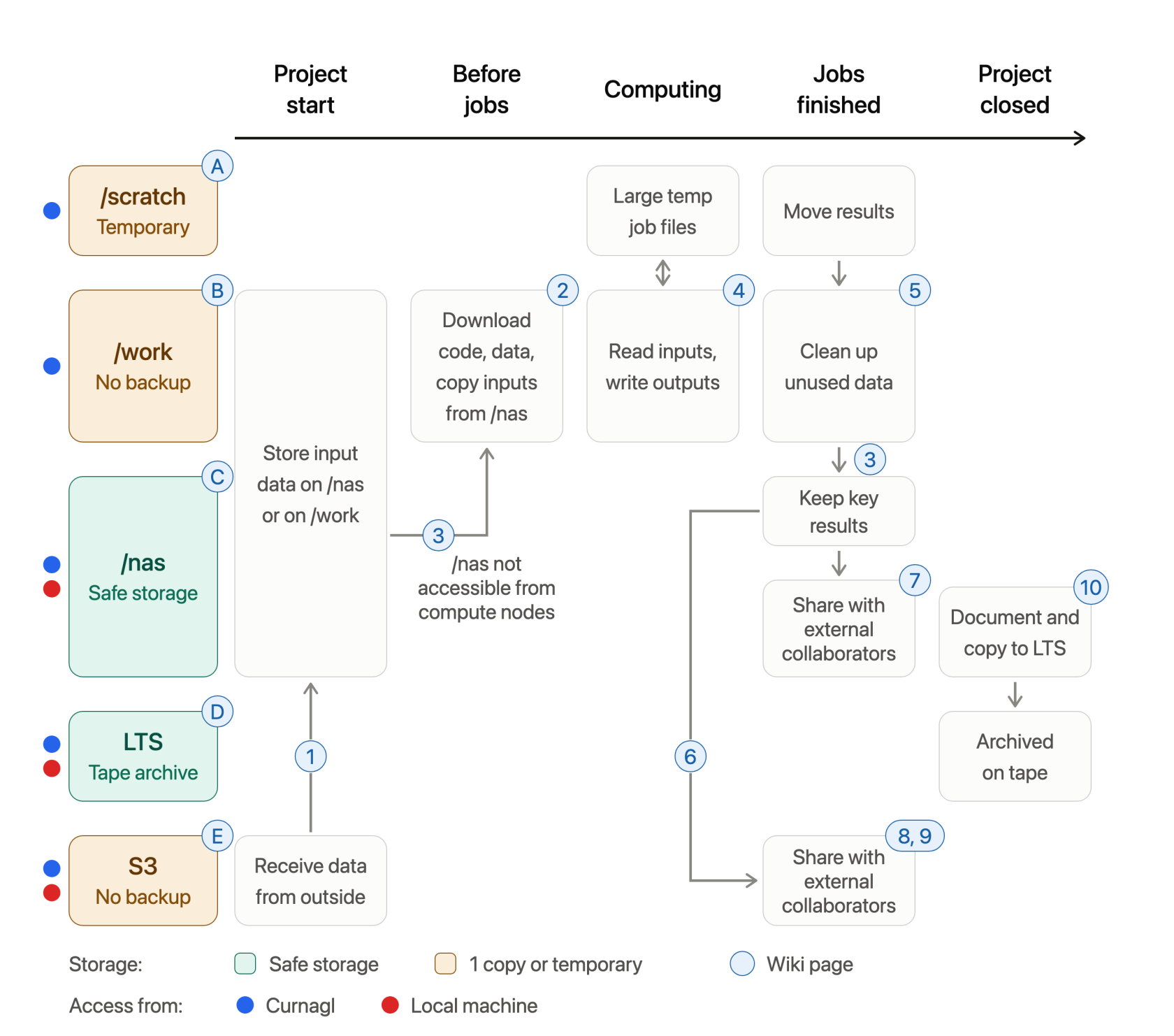
Read it from left to right: each column is a project stage, each row a storage system, and the arrows show where data moves. Amber storage has a single copy or is temporary, so move important data out of it.

Letters refer to storage systems, which wiki pages are given below:

- A - [/scratch](https://wiki.unil.ch/ci/link/884#bkmrk-scratch)
- B - [/work](https://wiki.unil.ch/ci/link/884#bkmrk-work)
- C - [/nas](https://wiki.unil.ch/ci/books/research-data-storage/chapter/dcsr-nas-normal-or-personal-data)
- D - [LTS](https://wiki.unil.ch/ci/books/research-data-storage/chapter/long-term-storage-lts)
- E - [S3](https://wiki.unil.ch/ci/books/research-data-storage/chapter/s3-storage)

Each number links to a wiki page with detailed instructions:

1. [Transfert S3 DCSR to other support](https://wiki.unil.ch/ci/books/high-performance-computing-hpc/page/transfert-s3-dcsr-to-other-support)
2. [Transfer files to/from Curnagl](https://wiki.unil.ch/ci/books/high-performance-computing-hpc/page/transfer-files-tofrom-curnagl)
3. [Access NAS DCSR from the cluster](https://wiki.unil.ch/ci/books/high-performance-computing-hpc/page/access-nas-dcsr-from-the-cluster)
4. [How to run a job on Curnagl](https://wiki.unil.ch/ci/books/high-performance-computing-hpc/page/how-to-run-a-job-on-curnagl)
5. [How much space am I using?](https://wiki.unil.ch/ci/link/884#bkmrk-how-much-space-am-i-)
6. [Share files from a bucket with presign keys](https://wiki.unil.ch/ci/books/research-data-storage/page/share-files-from-a-bucket-with-presign-keys)
7. [Give access to DCSR NAS files to an external collaborator](https://wiki.unil.ch/ci/books/research-data-storage/page/give-access-to-dcsr-nas-files-to-an-external-collaborator)
8. [Filetransfer from the cluster](https://wiki.unil.ch/ci/books/high-performance-computing-hpc/page/filetransfer-from-the-cluster)
9. [SWITCHfilesender from the cluster](https://wiki.unil.ch/ci/books/high-performance-computing-hpc/page/switchfilesender-from-the-cluster)
10. [How to make an LTS request](https://wiki.unil.ch/ci/books/research-data-storage/page/how-to-make-a-lts-request)

### Sensitive Data (Urblauna)

#### Summary of storage file systems

<table border="1" id="bkmrk-storage-use-it-for-c-1" style="border-collapse: collapse; width: 100%;"><colgroup><col style="width: 14.4219%;"></col><col style="width: 20.6198%;"></col><col style="width: 7.98626%;"></col><col style="width: 10.9649%;"></col><col style="width: 26.6985%;"></col><col style="width: 19.3087%;"></col></colgroup><thead><tr><td>**Storage**</td><td>**Use it for**</td><td>**Copies**</td><td style="height: 46.6px;">**Safety**</td><td>**Quota cost (CHF/TB/year)**</td><td>**Accessible from**</td></tr></thead><tbody><tr><td>**/users**

**(home)**

</td><td style="height: 46.6px;">Configuration files</td><td style="height: 46.6px;">1</td><td style="height: 46.6px;">Safe</td><td style="height: 46.6px;">Free, quota is strict (50GB)</td><td style="height: 46.6px;">Urblauna login node</td></tr><tr><td>**/scratch**

</td><td>Temporary files of running jobs that need large amounts of data</td><td>1</td><td style="height: 46.6px;">No safety, may be deleted at any time</td><td>Free</td><td>Urblauna login and compute nodes

</td></tr><tr><td>**/data**</td><td>Data used in current computations</td><td>1</td><td style="height: 63.4px;">Moderate</td><td>See "U1 cost" for "GPFS (HPC - normal)" in the [costs page](https://wiki.unil.ch/ci/books/research-support/page/couts-operationnels-et-unitaires)</td><td>Urblauna login and compute nodes</td></tr><tr><td>**/work  
(read-only from Curnagl)**</td><td>Read-only from Urblauna

Software installed from Curnagl (with internet connection)

</td><td>1</td><td style="height: 52.2px;">Moderate</td><td>See "U1 cost" for "GPFS (HPC - sensible)" in the [costs page](https://wiki.unil.ch/ci/books/research-support/page/couts-operationnels-et-unitaires)</td><td>Urblauna login and compute nodes in read-only</td></tr><tr><td>**/archive (tape)**</td><td>Data of closed projects or not accessed regularly</td><td>2</td><td style="height: 85.8px;">Very Safe</td><td>See "U1 cost" for "Archivage (sensible)" in the [costs page](https://wiki.unil.ch/ci/books/research-support/page/couts-operationnels-et-unitaires)</td><td>Urblauna login node, quickly if data still in cache, very slowly otherwise (see [wiki](https://wiki.unil.ch/ci/link/1217#bkmrk-%2Farchive))

</td></tr></tbody></table>

#### Where to store your sensitive data during a project

[![urblauna_data_life_cycle_tresorit_v2.png](https://wiki.unil.ch/ci/uploads/images/gallery/2026-10/scaled-1680-/urblauna-data-life-cycle-tresorit-v2.png)](https://wiki.unil.ch/ci/uploads/images/gallery/2026-10/urblauna-data-life-cycle-tresorit-v2.png)

This diagram shows where to keep your data at each stage of a project.

Read it from left to right: each column is a project stage, each row a storage system, and the arrows show where data moves. Amber storage has a single copy or is temporary, so move important data out of it.

Letters refer to storage systems, which wiki pages are given below:

- A - [/scratch](https://wiki.unil.ch/ci/link/1217#bkmrk-%2Fscratch)
- B - [/data](https://wiki.unil.ch/ci/link/1217#bkmrk-%2Fdata)
- C - [/reference](https://wiki.unil.ch/ci/link/1217#bkmrk-%2Freference)
- D - [/work](https://wiki.unil.ch/ci/link/1217#bkmrk-%2Fwork)
- E - [/archive](https://wiki.unil.ch/ci/link/1217#bkmrk-%2Farchive)
- F - [Tresorit](https://wiki.unil.ch/ci/books/research-data-storage/chapter/sensitive-data-tresorit)

Each number links to a wiki page with detailed instructions:

1. [Urblauna access and data transfer](https://wiki.unil.ch/ci/books/high-performance-computing-hpc/page/urblauna-access-and-data-transfer)
2. [Installing your own software](https://wiki.unil.ch/ci/link/1217#bkmrk-installing-your-own-)
3. [How much space am I using?](https://wiki.unil.ch/ci/link/884#bkmrk-how-much-space-am-i-)
4. [Can I collaborate with external collaborators?](https://wiki.unil.ch/ci/link/1625#bkmrk-can-i-collaborate-wi)

### Good practices

- Move your results out of /scratch and /work (or /data for Urblauna) as soon as your computations are finished.
- Do not copy large read-only datasets to /scratch: /work (or /data for Urblauna) performance is more than sufficient for reading them.
- Using the `touch` command to prevent files from being purged from /scratch is strictly forbidden.
- Move data of closed projects: 
    - to LTS to free up /nas space for non-sensitive data,
    - to /archive for sensitive data.

### Quota increase

To increase a /nas or a /work quota, email <helpdesk@unil.ch> with "DCSR quota increase" in the subject line and the exact amount required. As this may increase quarterly invoices, we need the PI's approval before applying the change.

### More information

- [Detailed information about storage file systems in Curnagl](https://wiki.unil.ch/ci/link/884#bkmrk-storage)
- [Detailed information about storage file systems in Urblauna](https://wiki.unil.ch/ci/link/1217#bkmrk-storage)
- [Tresorit: <span lang="EN-US" style="mso-ansi-language: EN-US;">file storage and sharing service</span> for your local sensitive data](https://wiki.unil.ch/ci/books/research-data-storage/page/description-of-tresorit)