# Adding keywords (faculty web site validators)

Users with write permissions in faculty channels as well as UNICOM users will be able to add keywords to allow news and events ranking

<span id="bkmrk--1"></span>

#### <span lang="en">Preference Management</span>

[![image.png](https://wiki.unil.ch/ci/uploads/images/gallery/2026-01/scaled-1680-/80rimage.png)](https://wiki.unil.ch/ci/uploads/images/gallery/2026-01/80rimage.png)

<div class="entry-content clearfix" id="bkmrk--3"><div class="entry-content clearfix"><div class="tw-ta-container tw-nfl" id="bkmrk--4"></div></div></div><div class="entry-content clearfix" id="bkmrk-click-on-the-prefere"><div class="entry-content clearfix">1. <span lang="en">Click on the preferences management icon</span>
    
    <div class="tw-ta-container tw-nfl" id="bkmrk--5"></div>

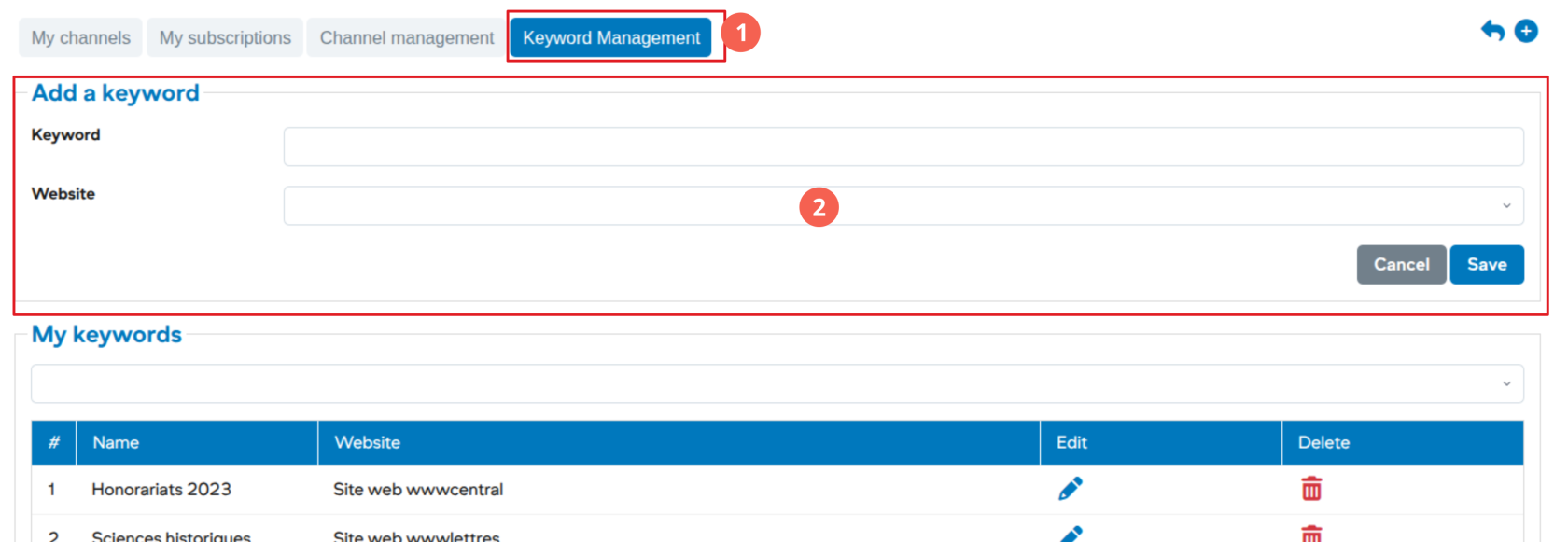
</div></div>#### Add a keyword

[![image.png](https://wiki.unil.ch/ci/uploads/images/gallery/2026-01/scaled-1680-/ZKIimage.png)](https://wiki.unil.ch/ci/uploads/images/gallery/2026-01/ZKIimage.png)

<div class="entry-content clearfix" id="bkmrk-go-to-keyword-manage"><div class="entry-content clearfix">1. Go to keyword management
2. Enter the new keyword and save

</div></div>***<span lang="en">Once added to the system, the new keyword can be used by all channels.</span>***

<div class="entry-content clearfix" id="bkmrk--7"><div class="tw-ta-container tw-nfl" id="bkmrk--8"></div></div>