# Relay news or events

Any element can be relayed at any time by the user in a channel for which it has write rights.

<span id="bkmrk--1"></span>

#### <span lang="en">News search to relay</span>

<div class="entry-content clearfix" id="bkmrk--2"><div class="entry-content clearfix"><div class="tw-ta-container tw-nfl" id="bkmrk--3"></div></div></div>[![image.png](https://wiki.unil.ch/ci/uploads/images/gallery/2026-01/scaled-1680-/QFgimage.png)](https://wiki.unil.ch/ci/uploads/images/gallery/2026-01/QFgimage.png)

<div class="entry-content clearfix" id="bkmrk-add-search-criteria-"><div class="entry-content clearfix">1. Select the elements to be relayed
2. Choose the option “Relay”

</div></div>#### <span lang="en">Validation of the relay</span>

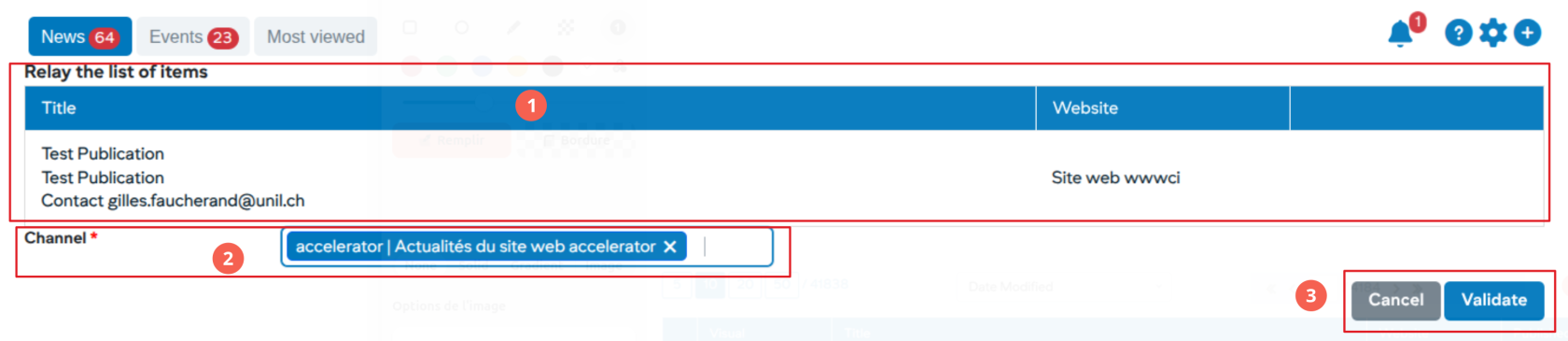
[![image.png](https://wiki.unil.ch/ci/uploads/images/gallery/2026-01/scaled-1680-/XRUimage.png)](https://wiki.unil.ch/ci/uploads/images/gallery/2026-01/XRUimage.png)

<div class="entry-content clearfix" id="bkmrk-list-of-elements-to-"><div class="entry-content clearfix">1. List of elements to be relayed
2. Choose the channel (s) in which to relay the elements
3. Validate relays

<div class="tw-ta-container tw-nfl">  
</div></div></div><span lang="en">After this step, the validated elements will be visible in the channels with an “R” status corresponding to the relay.</span>

<div class="entry-content clearfix" id="bkmrk--6"><div class="tw-ta-container tw-nfl" id="bkmrk--7"></div></div>