# Subscribe to a new or event channel

<span lang="en">Any member of the academic community may subscribe to news / events channels. The items published in these channels will then appear directly in the notifications of the “What’s New?” Application.</span>

<span id="bkmrk--1"></span>

#### <span lang="en">Preference Management</span>

<div class="entry-content clearfix" id="bkmrk--2"><div class="entry-content clearfix"><div class="tw-ta-container tw-nfl" id="bkmrk--3"></div></div></div>[![image.png](https://wiki.unil.ch/ci/uploads/images/gallery/2026-01/scaled-1680-/cwSimage.png)](https://wiki.unil.ch/ci/uploads/images/gallery/2026-01/cwSimage.png)

#### <span lang="en">Subscribe to one or more channels</span>

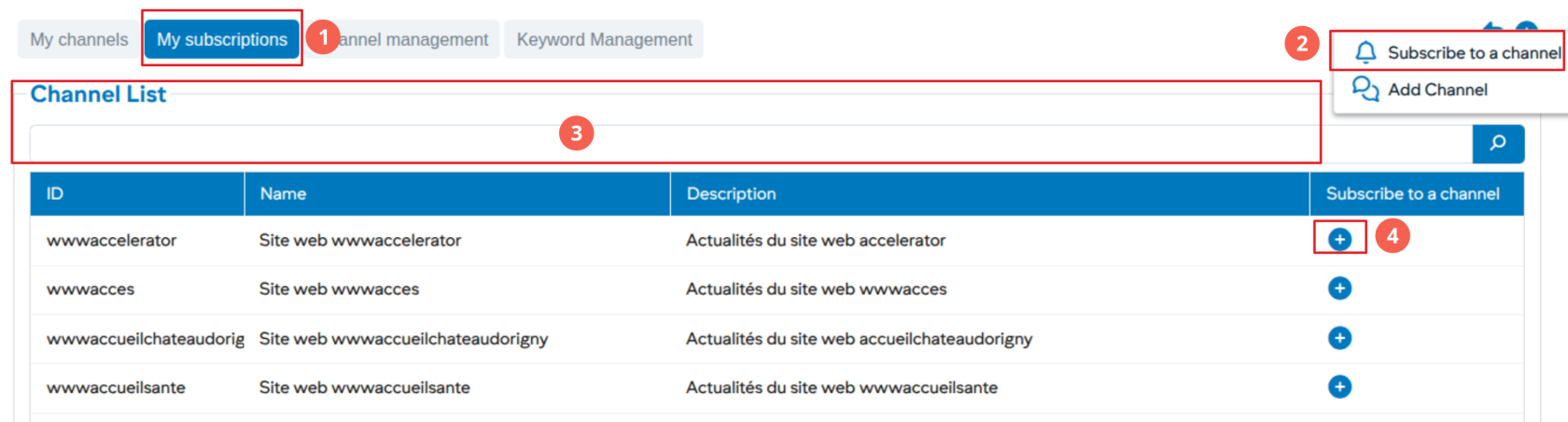
[![image.png](https://wiki.unil.ch/ci/uploads/images/gallery/2026-01/scaled-1680-/ZjUimage.png)](https://wiki.unil.ch/ci/uploads/images/gallery/2026-01/ZjUimage.png)

<div class="entry-content clearfix" id="bkmrk--6"><div class="entry-content clearfix"><div class="tw-ta-container tw-nfl" id="bkmrk--7"></div></div></div><div class="entry-content clearfix" id="bkmrk-choose-the-%E2%80%9Cmy-subsc">1. Choose the “My subscriptions” tab
2. Click on more to subscribe
3. Searching through existing channels
4. Subscribe to the channel by clicking on +

</div>