# Share files from a bucket with presign keys
## Purpose
AWS presigned URLs (or presign keys) are used to grant temporary access to objects in Amazon S3 without requiring the recipient to have AWS security credentials. Here are the main purposes:
- **Download Access**: You can generate a presigned URL to allow someone to download an object from your S3 bucket without needing their own AWS credentials
- **Upload Access**: Similarly, you can create a presigned URL to permit someone to upload a specific object to your S3 bucket
- **Time-Limited Access**: The access provided by a presigned URL is time-limited, meaning it will expire after a specified duration
This is particularly useful for sharing files securely or allowing temporary uploads without exposing your AWS credentials.
**Warning: only files can be shared this way, so if you want to share a folder, you have to create an archive of this folder first.**
## Prerequisite
The bucket has to be opened on the outside, if it's not the case, send an email to with the subject starting with "DCSR S3 bucket".
## Create a presign key with `aws-cli`
You can either install awscli on your laptop since it's a simple Python package, or use it from the cluster (there is a module called `awscli-v2` that you can simploy load).
#### Configuration
If it's not configured yet, you can run `aws configure` command. This will ask you for:
- AWS Access Key ID: you have to provide the read/write access key corresponding to your bucket
- AWS Secret Access Key: you have to provide the read/write secret key corresponding to your bucket
- Default region name: you can put `us-east-1`
- Default output format: you can put `json`
This will create two files:
- ~/.aws/config
- ~/.aws/credentials
#### Presign key creation
Let's consider that you want the file `to_share/important_file.gz` from the bucket `recn-fac-fbm-dep-greatpi-data`, you can use the following command:
```bash
aws --endpoint-url=https://s3.unil.ch s3 presign \
s3://recn-fac-fbm-dep-greatpi-data/to_share/important_file.gz \
--expires-in 604800
```
The value defined with --expires-in parameter is the validity of the link expressed in seconds. The maximum validity is 7 days.
This command will return a link that can be shared with your external collaborator.
## Create a presign key with Cyberduck
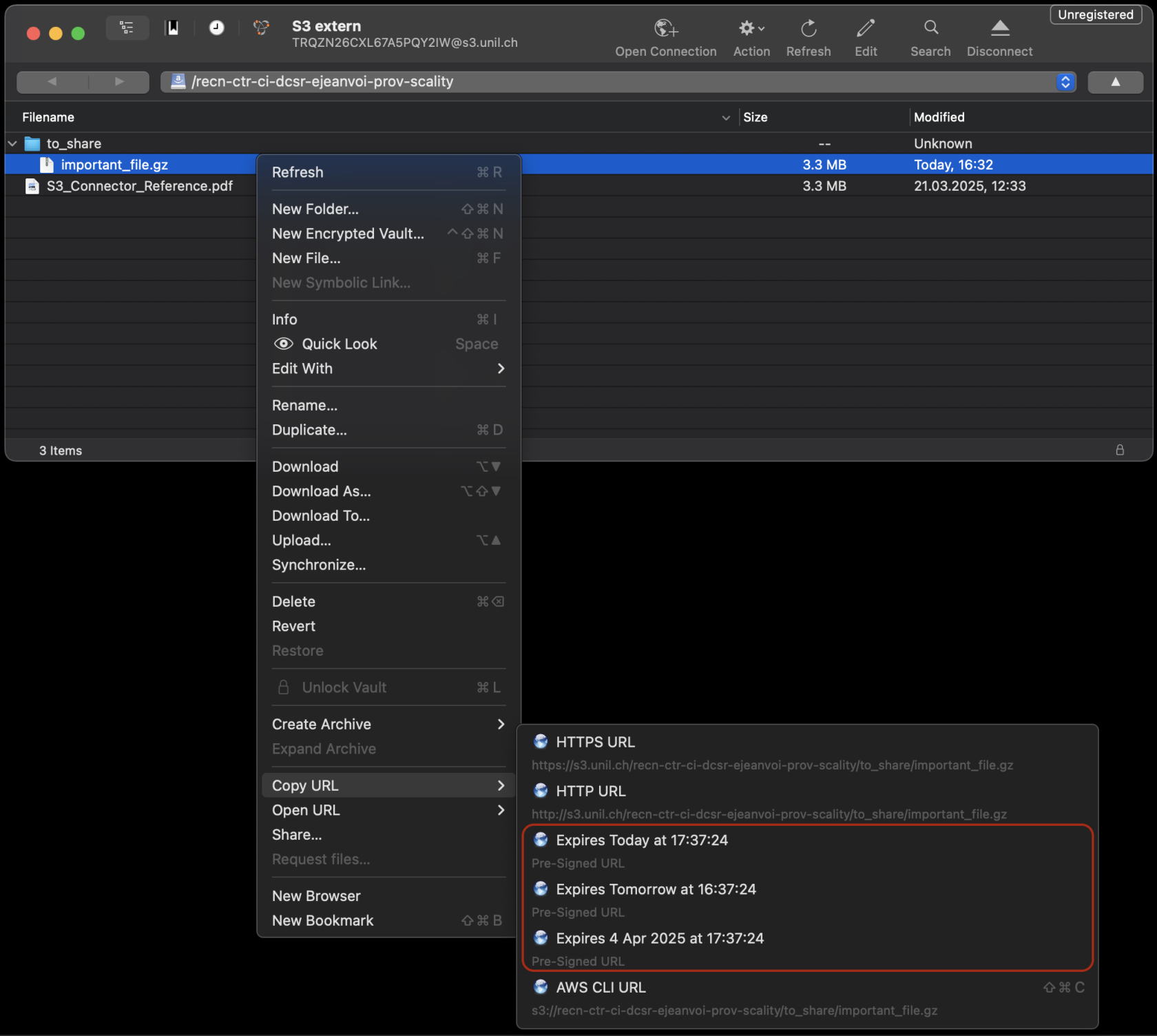
Once your connection to the bucket is configured with Cyberduck, you can browse it. Then right click to file you want to share, then choose "Copy URL", and choose one of the 3 expiration options (1 hour, 1 day, 1 week). Finally, just paste the result somewhere to get the link.
[](https://wiki.unil.ch/ci/uploads/images/gallery/2025-03/aosimage.png)