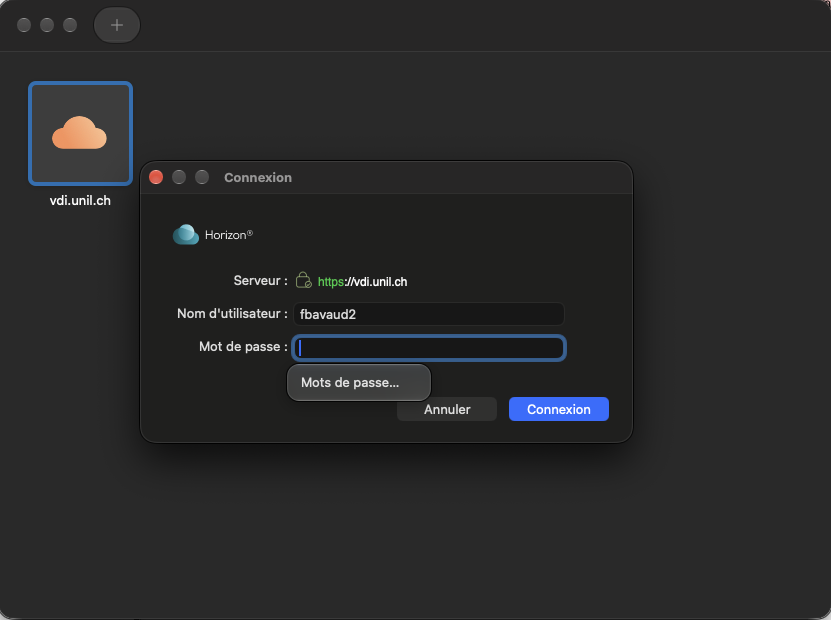
# Salles informatiques des facultés

Des salles informatiques sont mises à disposition par les facultés et gérées par le Centre informatique. Destinées aux étudiants de l'UNIL, ces salles disposent généralement des logiciels et outils destinés aux études et nécessaires aux déroulements de certains cours. Veuillez consulter la liste des salles pour vous renseigner sur les conditions d'accès.

# Doc publique

# Présentation du service VDI

Une infrastructure de bureau virtuelle (ou VDI = Virtual Desktop Infrastructure) est un système qui permet l’accès à un ordinateur virtuel depuis son ordinateur personnel. Ces bureaux virtuels sont créés lors de chaque connexion sur un serveur hébergé à l’UNIL qui fournit directement toute la puissance de calcul nécessaire à l’utilisation des programmes

Le service est ouvert aux étudiant·e·s des facultés suivantes :

- SSP
- GSE
- HEC
- Lettres
- FTSR
- FDCA 
    - sauf les membres de L'ESC, qui possède son propre VDI : https://esc-app.unil.ch

Le bureau virtuel est accessible via l’application VMware Horizon Client, une fois celle-ci installée sur son ordinateur ([marche à suivre](https://wiki.unil.ch/ci/books/salles-informatiques-des-facult%C3%A9s/page/vdi-acces)) :

- Pour utiliser la machine virtuelle, vous devez activer et utiliser l’[authentification à deux facteurs de Switch](https://wp.unil.ch/newsci/comment-activer-l-authentification-a-deux-facteurs-unil/).
- La connexion au bureau se fait avec le login UNIL après l’authentification à deux facteurs de Switch
- Une bonne connexion au réseau (WiFi ou filaire) est nécessaire pour garantir la stabilité du système.
- **Les bureaux virtuels sont détruits après chaque utilisation**. Il est donc nécessaire de [sauvegarder toutes vos données](https://wiki.unil.ch/ci/books/salles-informatiques-des-facult%C3%A9s/page/vdi-recuperer-des-donnees) avant de vous déconnecter du VDI.<ins></ins>
- L'utilisation du VDI par le web n'est pas recommandé ! Il s'agit uniquement d'une solution d'appoint.

# Connexion au VDI

## Installation du logiciel *Omnissa Horizon Client*

<p class="callout info">Le client Omnissa Horizon est disponible pour macOS, Windows, Linux, iOS et Android.</p>

<p class="callout info">Si votre ordinateur n'est pas compatible avec le client, vous pouvez vous connecter aux machine virtuelle depuis un navigateur.  
Le help desk pourra vous aider à mettre à jour votre ordinateur si nécessaire. Plus d'information : [unil.ch/ci/helpdesk](https://unil.ch/ci/helpdesk)</p>

1. Depuis un navigateur, rendez-vous sur la page [https://vdi.unil.ch](https://vdi.unil.ch)
2. Cliquez sur "Cliquez ici pour télécharger VMWare Horizon Client" 
    1. Si l'option n'est pas proposée, téléchargez la dernière version sur cette page : [Télécharger client Omnissa](https://customerconnect.omnissa.com/downloads/info/slug/desktop_end_user_computing/omnissa_horizon_clients/8)
    2. Pour les ordinateurs macOS 11 et macOS 12, téléchargez l'installeur sur cette page : [Téléchager client Omnissa](https://www2.unil.ch/softunil/horizon/)
3. Sur la ligne "Omnissa Horizon Clients", cliquez sur "View Download Components"
4. Sur la ligne correspondant à votre système d'exploitation, cliquez sur "Go to downloads"
5. Cliquez sur "Download now" pour télécharger le fichier d'installation
6. Installez le logiciel 
    1. Windows : 
        1. Double-cliquez sur le fichier *exe*
        2. Cliquez sur "Accepter et installer"
        3. Cliquez sur "Redémarrer maintenant" pour terminer l'installation
    2. macOS 
        1. Double-cliquez sur le fichier *dmg*
        2. Cliquez sur "Accepter"
        3. Glissez l'application VMware Horizon Client dans le dossier *Applications*

## Connexion à une machine virtuelle

<p class="callout danger">Pour accéder à l’environnement VDI (Virtual Desktop Infrastructure) depuis un emplacement hors campus, il est impératif de lancer au préalable le VPN de l’université disponible sur cette page : [Accès au VPN](https://www.unil.ch/ci/fr/home/menuinst/catalogue-de-services/reseau-et-telephonie/acces-hors-campus-vpn/documentation.html)</p>

Depuis l'application :

1. Ouvrez l'application *Omnissa Horizon Client*
2. Cliquez sur "Nouveau serveur"
3. Entrez l'adresse : vdi.unil.ch
4. Entrez vos identifiants UNIL dans le client vmware
5. Double-clliquez sur la machine virtuelle pour vous y connecter

Depuis un navigateur :

1. Depuis un navigateur, accéder à l'adresse [https://vdi.unil.ch](https://vdi.unil.ch)
2. Cliquez sur "VMware Horizon HTML Access"
3. Entrez vos identifiants UNIL
4. Double-clliquez sur la machine virtuelle pour vous y connecter

Depuis un ThinClient DELL (salles de Géopolis) :

1. Entrez vos identifiants UNIL dans le client vmware
2. Double-clliquez sur la machine virtuelle pour vous y connecter

---

## *VMware Horizon Client* installation  


<p class="callout info">The VMware Horizon Client is available for macOS, Windows, Linux, iOS and Android.</p>

<p class="callout info">If your computer is not compatible with the client, you can connect to the virtual machine from a browser.  
The help desk will be able to help you update your computer if necessary. More information: [unil.ch/ci/helpdesk](https://unil.ch/ci/helpdesk)</p>

1. From a browser, go to [https://vdi.unil.ch](https://vdi.unil.ch/)
2. Click on "Install Vmware Horizon Client". 
    1. If the link is not there, go on this page to download the last version : [Download Omnissa client](https://customerconnect.omnissa.com/downloads/info/slug/desktop_end_user_computing/omnissa_horizon_clients/8)
    2. For macOS 11 et macOS 12, download the installer on this page : [Download Omnissa client](https://www2.unil.ch/softunil/horizon/)
3. On the line "Omnissa Horizon Clients", click on "View Download Components"
4. On the line corresponding to your operating system, click on "Go to downloads".
5. Click "Download now" to download the installation file
6. Install the software 
    1. Windows: 
        1. Double-click on the exe file
        2. Click on "Accept and install"
        3. Click on "Restart now" to complete the installation
    2. macOS 
        1. Double-click on the dmg file
        2. Click on "Accept".
        3. Drag the VMware Horizon Client application to the Applications folder

## Connect to a virtual machine

<p class="callout danger">To access the Virtual Desktop Infrastructure (VDI) from an off-campus location, it is essential to first launch the university's VPN, available on this page: [*VPN Access*](https://www.unil.ch/ci/fr/home/menuinst/catalogue-de-services/reseau-et-telephonie/acces-hors-campus-vpn/documentation.html).</p>

From the application:

1. Open the Omnissa Horizon Client application
2. Click on "New Server"
3. Enter the address: vdi.unil.ch
4. Enter your UNIL credentials (username and password) in the vmware client
5. Double-click on the virtual machine to connect to it

From a browser:

1. From a browser, access [https://vdi.unil.ch](https://vdi.unil.ch)
2. Click on "VMware Horizon HTML Access
3. Enter your UNIL credentials (username and password)
4. Double-click on the virtual machine to connect to it

# Logiciels installés

## Demande d'ajout d'un logiciel dans les salles informatiques

Pour demander l'ajout d'un logiciel, écrivez un mail à helpdesk@unil.ch en indiquant les informations suivantes :

- Noms et versions de tous les logiciels que vous souhaitez faire installer
- Liens de téléchargement des logiciels à installer
- Salle(s) où l'installation doit être effectuée : 
    - VDI - Windows
    - Site de Sion, salle PC-Windows
    - Anthropole - salle Mac
- Remarques (Spécificités d'installation, licences etc)

## VDI - Windows

<form action="https://www.unil.ch/ci/fr/home/menuinst/catalogue-de-services/enseignement/salles-informatiques-des-facultes/page/main/liste-avec-presentation/demande-dinstallation-dun-logiciel-formulaire/demande-dajout-dun-logiciel-dans-les-salles-informatiques.formAction.do" class="unil-form" id="bkmrk-" method="post" novalidate="novalidate"></form>#### Logiciels par défaut

*Disponible pour tous*

<table aria-describedby="app_package_details_programs_table_info" border="0" cellpadding="0" cellspacing="0" id="bkmrk-gephi-0.9.2-v0.9.2-l" role="grid" style="border-collapse: collapse; width: 296pt; height: 599.063px;" width="393"><colgroup><col style="width: 223px;" width="222"></col><col style="width: 172px;" width="171"></col></colgroup><tbody><tr role="row" style="height: 29.7969px;"><td height="19" style="height: 29.7969px; width: 167pt;" width="222">Affinity Designer 2</td><td class="xl65" style="width: 129pt; height: 29.7969px;" width="171">2.5.3.2516</td></tr><tr style="height: 29.7969px;"><td height="19" style="height: 29.7969px;">Affinity Photo 2</td><td class="xl65" style="width: 129pt; height: 29.7969px;" width="171">2.5.3.2516</td></tr><tr style="height: 29.7969px;"><td height="19" style="height: 29.7969px;">Affinity Publisher 2</td><td class="xl65" style="width: 129pt; height: 29.7969px;" width="171">2.5.3.2516</td></tr><tr style="height: 29.7969px;"><td height="19" style="height: 29.7969px;">7-Zip</td><td class="xl65" style="width: 129pt; height: 29.7969px;" width="171">25.01</td></tr><tr style="height: 29.7969px;"><td height="19" style="height: 29.7969px;">VLC media player</td><td class="xl65" style="width: 129pt; height: 29.7969px;" width="171">  
</td></tr><tr style="height: 29.7969px;"><td height="19" style="height: 29.7969px;">LibreOffice</td><td class="xl66" style="width: 129pt; height: 29.7969px;" width="171">25.2.5.2</td></tr><tr style="height: 46.5938px;"><td height="19" style="height: 46.5938px;">Notepad++<span style="mso-spacerun: yes;"> </span></td><td class="xl66" style="width: 129pt; height: 46.5938px;" width="171">8.8.5</td></tr><tr style="height: 29.7969px;"><td height="19" style="height: 29.7969px;">Mozilla Firefox</td><td class="xl65" style="width: 129pt; height: 29.7969px;" width="171">142</td></tr><tr style="height: 29.7969px;"><td height="19" style="height: 29.7969px;">GoogleChrome</td><td class="xl65" style="width: 129pt; height: 29.7969px;" width="171">139</td></tr><tr style="height: 37.8594px;"><td style="height: 37.8594px;"> Zotero</td><td style="width: 129pt; height: 37.8594px;">7.0.24</td></tr><tr style="height: 29.7969px;"><td style="height: 29.7969px;">Visual Studio Code</td><td class="xl67" style="width: 129pt; height: 29.7969px;" width="171">1.103.2</td></tr><tr style="height: 29.7969px;"><td style="height: 29.7969px;">Git</td><td class="xl65" style="width: 129pt; height: 29.7969px;" width="171">2.51.0</td></tr><tr style="height: 29.7969px;"><td height="19" style="height: 29.7969px;">Python 3.13</td><td class="xl65" style="width: 129pt; height: 29.7969px;" width="171">3.13.7150.0</td></tr><tr style="height: 37.8594px;"><td height="19" style="height: 37.8594px;">Spyder 6</td><td class="xl66" style="width: 129pt; height: 37.8594px;" width="171">6.0.8</td></tr></tbody></table>

#### Statistiques

*Disponible pour tous*

<table border="0" cellpadding="0" cellspacing="0" id="bkmrk-jasp-0.14.1.0-rstudi" style="border-collapse: collapse; width: 275pt;" width="366"><colgroup><col style="width: 293px;" width="293"></col><col style="width: 73px;" width="73"></col></colgroup><tbody><tr style="height: 14.5pt;"><td height="19" style="height: 14.5pt; width: 220pt;" width="293">JASP</td><td class="xl65" style="width: 55pt;" width="73">0.14.1.0</td></tr><tr style="height: 14.5pt;"><td height="19" style="height: 14.5pt;">RStudio</td><td><div class="break">2025.05.1+513</div></td></tr><tr style="height: 14.5pt;"><td height="19" style="height: 14.5pt;">jamovi<span style="mso-spacerun: yes;"> </span></td><td class="xl65" style="width: 55pt;" width="73">1.6.23.0</td></tr><tr style="height: 29.0pt;"><td height="39" style="height: 29.0pt;">Stata 19.5</td><td class="xl65" style="width: 55pt;" width="73">19.50.0000</td></tr><tr style="height: 14.5pt;"><td height="19" style="height: 14.5pt;">PsychoPy3<span style="mso-spacerun: yes;"> </span></td><td align="right" class="xl66 align-left" style="width: 55pt;" width="73">2025.1.1</td></tr><tr style="height: 14.5pt;"><td height="19" style="height: 14.5pt;">IBM SPSS Amos</td><td class="xl65" style="width: 55pt;" width="73">29.0.0.0</td></tr><tr style="height: 14.5pt;"><td height="19" style="height: 14.5pt;">IBM SPSS Statistics</td><td class="xl65" style="width: 55pt;" width="73">29.0.2.0</td></tr><tr style="height: 14.5pt;"><td height="19" style="height: 14.5pt;">R for Windows</td><td class="xl65" style="width: 55pt;" width="73">4.5.1</td></tr></tbody></table>

#### Lettres

*Disponible pour les membres de la faculté des Lettres*

<table border="1" id="bkmrk-xml-copy-editor-1.3." style="border-collapse: collapse; width: 100%; height: 149px;"><colgroup><col style="width: 50%;"></col><col style="width: 50%;"></col></colgroup><tbody><tr style="height: 29.8px;"><td style="height: 29.8px;">XML Copy Editor  
</td><td style="height: 29.8px;">1.3.0.0  
</td></tr><tr style="height: 29.8px;"><td style="height: 29.8px;">Anaconda3  
</td><td style="height: 29.8px;">2021.11  
</td></tr><tr style="height: 29.8px;"><td style="height: 29.8px;">Github Desktop  
</td><td style="height: 29.8px;">3.0  
</td></tr><tr style="height: 29.8px;"><td style="height: 29.8px;">Orange  
</td><td style="height: 29.8px;">3.32.0  
</td></tr><tr style="height: 29.8px;"><td style="height: 29.8px;">Knime Analytics Platform  
</td><td style="height: 29.8px;">4.5.2</td></tr></tbody></table>

#### SSP

*Disponible pour les membres de la faculté des SSP*

<table border="1" id="bkmrk-nvivo-20.7.1.1534" style="border-collapse: collapse; width: 100%; border-width: 1px;"><colgroup><col style="width: 50%;"></col><col style="width: 50%;"></col></colgroup><tbody><tr><td style="border-width: 1px;">NVIVO  
</td><td style="border-width: 1px;">20.7.1.1534</td></tr></tbody></table>

#### HEC

*Disponible pour les membres de la faculté des HEC*

<table border="1" id="bkmrk-stata-17.0-matlab-20" style="border-collapse: collapse; width: 100%;"><colgroup><col style="width: 50%;"></col><col style="width: 50%;"></col></colgroup><tbody><tr><td>Matlab  
</td><td>2024b</td></tr><tr><td>Dynare  
</td><td>5.4  
</td></tr><tr><td>Palisade Decision Tools Suite  
</td><td>8.2.00172.0  
</td></tr></tbody></table>

#### GSE

*Disponible pour les membres de la FGSE*

<table border="0" cellpadding="0" cellspacing="0" id="bkmrk-coltop3d-professiona" style="border-collapse: collapse; width: 617px; height: 805.516px;" width="906"><colgroup><col style="width: 357px;" width="453"></col><col style="width: 357px;" width="453"></col></colgroup><tbody><tr style="height: 29.7969px;"><td height="19" style="height: 29.7969px; width: 340pt;" width="453">Coltop3D Professional 1.8 - Academic Edition</td><td class="xl65" style="width: 340pt; height: 29.7969px;" width="453">1.8</td></tr><tr style="height: 29.7969px;"><td height="19" style="height: 29.7969px;">SAGA<span style="mso-spacerun: yes;"> </span></td><td class="xl65" style="width: 340pt; height: 29.7969px;" width="453">7.9.0</td></tr><tr style="height: 29.7969px;"><td height="19" style="height: 29.7969px;">Rocscience Software Suite</td><td class="xl65" style="width: 340pt; height: 29.7969px;" width="453">1.090</td></tr><tr style="height: 29.7969px;"><td height="19" style="height: 29.7969px;">ColtopGIS</td><td class="xl65" style="width: 340pt; height: 29.7969px;" width="453">13.1.648</td></tr><tr style="height: 29.7969px;"><td height="19" style="height: 29.7969px;">CloudCompare<span style="mso-spacerun: yes;"> </span></td><td class="xl65" style="width: 340pt; height: 29.7969px;" width="453">2.14.alpha (09-02-2025)</td></tr><tr style="height: 29.7969px;"><td height="19" style="height: 29.7969px;">BASEMENT version<span style="mso-spacerun: yes;"> </span></td><td class="xl65" style="width: 340pt; height: 29.7969px;" width="453">2.8.2</td></tr><tr style="height: 29.7969px;"><td height="19" style="height: 29.7969px;">RS MINERVE</td><td class="xl65" style="width: 340pt; height: 29.7969px;" width="453">2.9.1.0</td></tr><tr style="height: 29.7969px;"><td height="19" style="height: 29.7969px;">BASEMENT</td><td class="xl65" style="width: 340pt; height: 29.7969px;" width="453">3.1.1</td></tr><tr style="height: 29.7969px;"><td height="19" style="height: 29.7969px;">QGIS</td><td class="xl65" style="width: 340pt; height: 29.7969px;" width="453">3.28.3 / 3.40</td></tr><tr style="height: 30.7969px;"><td height="19" style="height: 30.7969px;">ILWIS</td><td class="xl65" style="width: 340pt; height: 30.7969px;" width="453">3.8.6</td></tr><tr style="height: 29.7969px;"><td height="19" style="height: 29.7969px;">Risoe TL/OSL Software Package</td><td class="xl65" style="width: 340pt; height: 29.7969px;" width="453">2020c</td></tr><tr style="height: 29.7969px;"><td height="19" style="height: 29.7969px;">3DF Zephyr Lite</td><td class="xl65" style="width: 340pt; height: 29.7969px;" width="453">5.019</td></tr><tr style="height: 29.7969px;"><td height="19" style="height: 29.7969px;">ESA SNAP</td><td class="xl65" style="width: 340pt; height: 29.7969px;" width="453">8.0</td></tr><tr style="height: 29.7969px;"><td style="height: 29.7969px;">Matlab 2024a  
</td><td style="width: 340pt; height: 29.7969px;">24.1  
</td></tr><tr style="height: 29.7969px;"><td height="19" style="height: 29.7969px; width: 276pt;" width="368">Res2dinvx64<span style="mso-spacerun: yes;"> </span></td><td class="xl65" style="width: 55pt; height: 29.7969px;" width="73">4.03</td></tr><tr style="height: 29.7969px;"><td height="19" style="height: 29.7969px;">Surfer 12</td><td class="xl65" style="width: 55pt; height: 29.7969px;" width="73">12.8.1009</td></tr><tr style="height: 29.7969px;"><td height="19" style="height: 29.7969px;">RadExPro Professional 2017.3</td><td class="xl65" style="width: 55pt; height: 29.7969px;" width="73">2017.3</td></tr><tr style="height: 29.7969px;"><td height="19" style="height: 29.7969px;">Prosys II</td><td class="xl65" style="width: 55pt; height: 29.7969px;" width="73">3.14.0000</td></tr><tr style="height: 29.7969px;"><td style="height: 29.7969px;">PostGis  
</td><td style="width: 55pt; height: 29.7969px;">3.1.1  
</td></tr><tr style="height: 29.7969px;"><td style="height: 29.7969px;">PostgreSQL  
</td><td style="width: 55pt; height: 29.7969px;">13  
</td></tr><tr style="height: 29.7969px;"><td style="height: 29.7969px;">DBeaver  
</td><td style="width: 55pt; height: 29.7969px;">21.0.5  
</td></tr><tr style="height: 29.7969px;"><td style="height: 29.7969px;">pgAdmin 4  
</td><td style="width: 55pt; height: 29.7969px;">5.3  
</td></tr></tbody></table>

#### ArcGis

*Disponible pour les membres de la FGSE*

<table border="0" cellpadding="0" cellspacing="0" id="bkmrk-arcgis-10.8.14362-ar" style="border-collapse: collapse; width: 145pt;" width="193"><colgroup><col style="width: 88px;" width="88"></col><col style="width: 105px;" width="105"></col></colgroup><tbody><tr style="height: 14.5pt;"><td height="19" style="height: 14.5pt;">ArcGis Pro</td><td><div class="break">3.5.57366</div></td></tr></tbody></table>

## macOS (ANT - 5183)  


Liste des logiciels installés par défaut dès la rentrée de septembre 2024.

Système d'exploitation : macOS 14 (Sonoma)

### Internet

<table border="0" cellpadding="0" cellspacing="0" id="bkmrk-firefox-116.0.2-goog" style="border-collapse: collapse; width: 617px; height: 87px;" width="906"><colgroup><col style="width: 357px;" width="453"></col><col style="width: 357px;" width="453"></col></colgroup><tbody><tr style="height: 29px;"><td height="19" style="height: 29px;">Firefox</td><td class="xl65" style="width: 340pt; height: 29px;" width="453">  
</td></tr><tr style="height: 29px;"><td style="height: 29px;">Google Chrome</td><td style="width: 340pt; height: 29px;">  
</td></tr><tr style="height: 29px;"><td height="19" style="height: 29px;">Cyberduck</td><td class="xl65" style="width: 340pt; height: 29px;" width="453">  
</td></tr></tbody></table>

### Bureautique

<table border="0" cellpadding="0" cellspacing="0" id="bkmrk-microsoft-365-%28offic" style="border-collapse: collapse; width: 617px; height: 508px;" width="906"><colgroup><col style="width: 357px;" width="453"></col><col style="width: 357px;" width="453"></col></colgroup><tbody><tr style="height: 14.5pt;"><td height="19" style="height: 14.5pt; width: 340pt;" width="453">Microsoft 365 (Office, avec Teams) </td><td class="xl65" style="width: 340pt;" width="453">  
</td></tr><tr style="height: 14.5pt;"><td height="19" style="height: 14.5pt;">Libre Office</td><td class="xl65" style="width: 340pt;" width="453">  
</td></tr><tr><td style="height: 29px;">Acrobat Reader</td><td style="width: 340pt; height: 29px;">  
</td></tr><tr><td height="19" style="height: 29px;">Endnote</td><td class="xl65" style="width: 340pt; height: 29px;" width="453">  
</td></tr><tr><td style="height: 29px;">Zotero</td><td style="width: 340pt; height: 29px;">  
</td></tr></tbody></table>

### Multimédia

<table border="0" cellpadding="0" cellspacing="0" id="bkmrk-vlc-3.0.18-audacity-" style="border-collapse: collapse; width: 617px; height: 204px;" width="906"><colgroup><col style="width: 357px;" width="453"></col><col style="width: 357px;" width="453"></col></colgroup><tbody><tr style="height: 29px;"><td height="19" style="height: 29px;">VLC</td><td class="xl65" style="width: 340pt; height: 29px;" width="453">  
</td></tr><tr style="height: 30px;"><td height="19" style="height: 30px;">Audacity</td><td class="xl65" style="width: 340pt; height: 30px;" width="453">  
</td></tr><tr><td>Affinity Designer

</td><td style="width: 340pt;">  
</td></tr><tr><td>Affinity Publisher

</td><td style="width: 340pt;">  
</td></tr><tr><td>Affinity Photo

</td><td style="width: 340pt;">  
</td></tr></tbody></table>

### Statistiques

<table border="0" cellpadding="0" cellspacing="0" id="bkmrk-spss-28-r-4.3.1-rstu" style="border-collapse: collapse; width: 617px; height: 613.5px;" width="906"><colgroup><col style="width: 356.5px;" width="453"></col><col style="width: 356.5px;" width="453"></col></colgroup><tbody><tr style="height: 29px;"><td height="19" style="height: 29px;">SPSS</td><td class="xl65" style="width: 340pt; height: 29px;" width="453">  
</td></tr><tr style="height: 29px;"><td height="19" style="height: 29px;">R</td><td class="xl65" style="width: 340pt; height: 29px;" width="453">  
</td></tr><tr style="height: 29px;"><td height="19" style="height: 29px;">RStudio</td><td class="xl65" style="width: 340pt; height: 29px;" width="453">  
</td></tr></tbody></table>

### Autres logiciels

<table border="0" cellpadding="0" cellspacing="0" id="bkmrk-unarchiver-4.3.5-zoo" style="border-collapse: collapse; width: 617px; height: 577px;" width="906"><colgroup><col style="width: 356.5px;" width="453"></col><col style="width: 356.5px;" width="453"></col></colgroup><tbody><tr style="height: 29px;"><td height="19" style="height: 29px;">Unarchiver</td><td class="xl65" style="width: 340pt; height: 29px;" width="453">  
</td></tr><tr style="height: 29px;"><td height="19" style="height: 29px;">Zoom</td><td class="xl65" style="width: 340pt; height: 29px;" width="453">  
</td></tr><tr style="height: 29px;"><td height="19" style="height: 29px;">Visual Studio Code</td><td class="xl65" style="width: 340pt; height: 29px;" width="453">  
</td></tr><tr style="height: 29px;"><td height="19" style="height: 29px;">VMware Horizon Client (VDI UNIL)</td><td class="xl65" style="width: 340pt; height: 29px;" width="453">  
</td></tr><tr style="height: 29px;"><td height="19" style="height: 29px;">QGIS</td><td class="xl65" style="width: 340pt; height: 29px;" width="453">  
</td></tr></tbody></table>

# Liste des salles informatiques par bâtiment

Plusieurs salles informatiques sont à disposition des étudiants de l'UNIL. La liste ci-dessous les répertorie et vous informe, pour chacune d'elles, des conditions d'accès, de l'équipement informatique disponible et de la personne à contacter pour obtenir de l'assistance.

Une faculté peut mandater le Centre informatique pour l'ouverture et le gestion d'une salle informatique. Pour cela, nous prions les personnes intéressées d'envoyer [une demande à notre help desk](https://www.unil.ch/ci/helpdesk).

Sous réserve d'acceptation de votre demande, les modalités (financement, gestion, accès etc) seront alors discutées avec un responsable Ci.

---

## Amphipôle

<table border="1" id="bkmrk-amphip%C3%B4le-204.2-%C2%A0-%C3%89t" style="border-collapse: collapse; width: 100%; height: 214px;"><tbody><tr style="height: 11px;"><td style="width: 30.9876%; height: 11px; background-color: #ebebeb;">**Amphipôle 204.2**

</td><td style="width: 69.0124%; height: 11px;">  
</td></tr><tr style="height: 29px;"><td style="width: 30.9876%; height: 29px;">Étudiant·e·s autorisé·e·s</td><td style="width: 69.0124%; height: 29px;">École de biologie FBM, authentification à l’entrée via campus card + session authentifiée via username/password UNIL</td></tr><tr style="height: 29px;"><td style="width: 30.9876%; height: 29px;">Responsable</td><td style="width: 69.0124%; height: 29px;">Julien Gianotti (021 692 41 71)</td></tr><tr style="height: 29px;"><td style="width: 30.9876%; height: 29px;">Assistance</td><td style="width: 69.0124%; height: 29px;">Julien Gianotti (021 692 41 71)

Michel Schuepbach (021 692 35 82)

</td></tr><tr style="height: 29px;"><td style="width: 30.9876%; height: 29px;">Ordinateurs</td><td style="width: 69.0124%; height: 29px;">31 PC sous Windows 10</td></tr><tr style="height: 29px;"><td style="width: 30.9876%; height: 29px;">Imprimantes</td><td style="width: 69.0124%; height: 29px;">imprimantes laser</td></tr><tr style="height: 29px;"><td style="width: 30.9876%; height: 29px;">Autre matériel</td><td style="width: 69.0124%; height: 29px;">Vidéo projecteur et rétroprojecteur</td></tr><tr style="height: 29px;"><td style="width: 30.9876%; height: 29px;">Remarques</td><td style="width: 69.0124%; height: 29px;">Réservation de la salle :

Jacqueline.Noto@unil.ch (021 692 40 13)

</td></tr></tbody></table>

---

<table border="1" id="bkmrk-amphip%C3%B4le-140%2C-140.1" style="border-collapse: collapse; width: 100%; height: 214px;"><tbody><tr style="height: 11px;"><td style="width: 30.9876%; height: 11px; background-color: #ebebeb;">**Amphipôle 140, 140.1 et 146 - Salles du tapis vert**

</td><td style="width: 69.0124%; height: 11px;">  
</td></tr><tr style="height: 29px;"><td style="width: 30.9876%; height: 29px;">Étudiant·e·s autorisé·e·s</td><td style="width: 69.0124%; height: 29px;">Tous

Authentification via mot de passe UNIL (idem e-mail) requise

</td></tr><tr style="height: 29px;"><td style="width: 30.9876%; height: 29px;">Responsable</td><td style="width: 69.0124%; height: 29px;">Michel Schuepbach (21 692 35 82)

Julien Gianotti (021 692 41 71)

</td></tr><tr style="height: 29px;"><td style="width: 30.9876%; height: 29px;">Assistance</td><td style="width: 69.0124%; height: 29px;">les responsables ou par mail admin\_pol140@unil.ch</td></tr><tr style="height: 29px;"><td style="width: 30.9876%; height: 29px;">Ordinateurs</td><td style="width: 69.0124%; height: 29px;">Pol 140 : 16 + 1 iMac

Pol 140.1 : 12 iMac

Pol 146 : 36 + 1 iMac

</td></tr><tr style="height: 29px;"><td style="width: 30.9876%; height: 29px;">Imprimantes</td><td style="width: 69.0124%; height: 29px;">Machines branchées sur le service [PrintUNIL](https://www.unil.ch/ci/printunil "Imprimantes multifonctions - PrintUNIL (public)")</td></tr><tr style="height: 29px;"><td style="width: 30.9876%; height: 29px;">Autre matériel</td><td style="width: 69.0124%; height: 29px;">Vidéo Projecteur et rétroprojecteur</td></tr><tr style="height: 29px;"><td style="width: 30.9876%; height: 29px;">Remarques</td><td style="width: 69.0124%; height: 29px;">Réservation de la salle :

Jacqueline.Noto@unil.ch (021 692 40 13)  
Attention :

Les cours sont prioritaires sur l'accès en libre service et les salles sont fermées en dehors des périodes de cours

</td></tr></tbody></table>

---

### Anthropole

<table border="1" id="bkmrk-anthropole-5183-%C2%A0-%C3%89t" style="border-collapse: collapse; width: 100%; height: 157px;"><tbody><tr style="height: 11px;"><td style="width: 30.9876%; height: 11px; background-color: #ebebeb;">[**Anthropole 5183**](https://planete.unil.ch/plan/?local=%27ANT-5183%27)

</td><td style="width: 69.0124%; height: 11px;">  
</td></tr><tr style="height: 29px;"><td style="width: 30.9876%; height: 29px;">Étudiant·e·s autorisé·e·s</td><td style="width: 69.0124%; height: 29px;">Tous

Authentification via mot de passe UNIL (idem e-mail) requise

</td></tr><tr style="height: 29px;"><td style="width: 30.9876%; height: 29px;">Responsable</td><td style="width: 69.0124%; height: 29px;">Centre informatique</td></tr><tr style="height: 29px;"><td style="width: 30.9876%; height: 30px;">Assistance</td><td style="width: 69.0124%; height: 30px;">HelpDesk (021 692 22 11) helpdesk@unil.ch</td></tr><tr style="height: 29px;"><td style="width: 30.9876%; height: 29px;">Ordinateurs</td><td style="width: 69.0124%; height: 29px;">21 iMac, équipés de tous les logiciels nécessaires (bureautique, internet, statistique). Ports USB-C pour vos clefs USB.</td></tr><tr style="height: 29px;"><td style="width: 30.9876%; height: 29px;">Imprimantes</td><td style="width: 69.0124%; height: 29px;">Machines branchées sur le service [PrintUNIL](https://www.unil.ch/ci/printunil "Imprimantes multifonctions - PrintUNIL (public)")</td></tr></tbody></table>

---

<table border="1" id="bkmrk-anthropole-2012-%C2%A0-%C3%89t" style="border-collapse: collapse; width: 100%; height: 236.563px;"><tbody><tr style="height: 35.3906px;"><td style="width: 30.9876%; height: 35.3906px; background-color: rgb(235, 235, 235);">[**Anthropole 2012**](https://planete.unil.ch/plan/?local=%27ANT-2012%27)

</td><td style="width: 69.0124%; height: 35.3906px;">  
</td></tr><tr style="height: 46.5938px;"><td style="width: 30.9876%; height: 46.5938px;">Étudiant·e·s autorisé·e·s</td><td style="width: 69.0124%; height: 46.5938px;">Tous

Authentification via mot de passe UNIL (idem e-mail) requise

</td></tr><tr style="height: 29.7969px;"><td style="width: 30.9876%; height: 29.7969px;">Responsable</td><td style="width: 69.0124%; height: 29.7969px;">Centre informatique</td></tr><tr style="height: 29.7969px;"><td style="width: 30.9876%; height: 29.7969px;">Assistance</td><td style="width: 69.0124%; height: 29.7969px;">HelpDesk (021 692 22 11) helpdesk@unil.ch</td></tr><tr style="height: 29.7969px;"><td style="width: 30.9876%; height: 29.7969px;">Ordinateurs</td><td style="width: 69.0124%; height: 29.7969px;">22 + 1 PC sous Windows 7</td></tr><tr style="height: 35.3906px;"><td style="width: 30.9876%; height: 35.3906px;">Imprimantes</td><td style="width: 69.0124%; height: 35.3906px;">Machines branchées sur le service [PrintUNIL](https://www.unil.ch/ci/printunil "Imprimantes multifonctions - PrintUNIL (public)")</td></tr><tr style="height: 29.7969px;"><td style="width: 30.9876%; height: 29.7969px;">Autre matériel</td><td style="width: 69.0124%; height: 29.7969px;">Graveurs de CD + DVD, DocUNIL, ports USB pour vos clefs USB</td></tr></tbody></table>

---

### Bramois

<table border="1" id="bkmrk-amphip%C3%B4le-204.2-%C2%A0-%C3%89t-0" style="border-collapse: collapse; width: 100%; height: 214px;"><tbody><tr style="height: 11px;"><td style="width: 30.9876%; height: 11px; background-color: #ebebeb;">**IUKB - Bramois, Sion**

</td><td style="width: 69.0124%; height: 11px;">  
</td></tr><tr style="height: 29px;"><td style="width: 30.9876%; height: 29px;">Étudiant·e·s autorisé·e·s</td><td style="width: 69.0124%; height: 29px;">Etudiants UNIL, UNIGE</td></tr><tr style="height: 29px;"><td style="width: 30.9876%; height: 29px;">Responsable</td><td style="width: 69.0124%; height: 29px;">Centre informatique</td></tr><tr style="height: 29px;"><td style="width: 30.9876%; height: 29px;">Assistance</td><td style="width: 69.0124%; height: 29px;">help desk (021 692 22 11) helpdesk@unil.ch</td></tr><tr style="height: 29px;"><td style="width: 30.9876%; height: 29px;">Ordinateurs</td><td style="width: 69.0124%; height: 29px;">4 PC</td></tr><tr style="height: 29px;"><td style="width: 30.9876%; height: 29px;">Imprimantes</td><td style="width: 69.0124%; height: 29px;">Machines branchées sur le service [PrintUNIL](https://www.unil.ch/ci/printunil "Imprimantes multifonctions - PrintUNIL (public)")</td></tr></tbody></table>

---

### CHUV

<table border="1" id="bkmrk-chuv-bdfm-%28biblioth%C3%A8" style="border-collapse: collapse;"><tbody><tr style="height: 11px;"><td style="width: 30.9876%; height: 11px; background-color: #ebebeb;">**CHUV BDFM (Bibliothèque et Centre de Documentation de la Faculté de Médecine)**

</td><td style="width: 69.0124%; height: 11px;">  
</td></tr><tr style="height: 29px;"><td style="width: 30.9876%; height: 29px;">Étudiant·e·s autorisé·e·s</td><td style="width: 69.0124%; height: 29px;">Tous

Authentification par login CHUV sur les postes CHUV

</td></tr><tr style="height: 29px;"><td style="width: 30.9876%; height: 29px;">Responsable</td><td style="width: 69.0124%; height: 29px;">Patrick Furrer (021 314 50 83)</td></tr><tr style="height: 29px;"><td style="width: 30.9876%; height: 29px;">Assistance</td><td style="width: 69.0124%; height: 29px;">Pour tout problème, adressez-vous au desk de la BDFM ou par mail : bium@chuv.ch</td></tr><tr style="height: 29px;"><td style="width: 30.9876%; height: 29px;">Ordinateurs</td><td style="width: 69.0124%; height: 29px;">3 ordinateurs pour les collaboratrices et collaborateurs du CHUV (zone d'accueil)

6 bornes internet UNIL (zone d'accueil et zone d'impression)

</td></tr><tr style="height: 29px;"><td style="width: 30.9876%; height: 29px;">Imprimantes</td><td style="width: 69.0124%; height: 29px;">Imprimantes PrintUNIL &amp; 1 imprimante CHUV (uniquement pour collaborateurs et collaboratrices du CHUV)  
</td></tr></tbody></table>

---

### Géopolis

<table border="1" id="bkmrk-amphip%C3%B4le-204.2-%C2%A0-%C3%89t-1" style="border-collapse: collapse; width: 100%; height: 214px;"><tbody><tr style="height: 11px;"><td style="width: 30.9876%; height: 11px; background-color: #ebebeb;">[**Géopolis 2113**](https://planete.unil.ch/plan/?local=%27GEO-2113%27)

</td><td style="width: 69.0124%; height: 11px;">  
</td></tr><tr style="height: 29px;"><td style="width: 30.9876%; height: 29px;">Étudiant·e·s autorisé·e·s</td><td style="width: 69.0124%; height: 29px;">Tous

Authentification via mot de passe UNIL (idem e-mail) requise

</td></tr><tr style="height: 29px;"><td style="width: 30.9876%; height: 29px;">Responsable</td><td style="width: 69.0124%; height: 29px;">GSE et Centre informatique</td></tr><tr style="height: 29px;"><td style="width: 30.9876%; height: 29px;">Assistance</td><td style="width: 69.0124%; height: 29px;">help desk (021 692 22 11) helpdesk@unil.ch</td></tr><tr style="height: 29px;"><td style="width: 30.9876%; height: 29px;">Ordinateurs</td><td style="width: 69.0124%; height: 29px;">16 clients légers  
</td></tr><tr style="height: 29px;"><td style="width: 30.9876%; height: 29px;">Imprimantes</td><td style="width: 69.0124%; height: 29px;">Machines branchées sur le service [PrintUNIL](https://www.unil.ch/ci/printunil "Imprimantes multifonctions - PrintUNIL (public)")</td></tr><tr style="height: 29px;"><td style="width: 30.9876%; height: 29px;">Autre matériel</td><td style="width: 69.0124%; height: 29px;">Projecteur et rétroprojecteur</td></tr><tr style="height: 29px;"><td style="width: 30.9876%; height: 29px;">Remarques</td><td style="width: 69.0124%; height: 29px;">Réservation de la salle :

Simon.Hiscox@unil.ch (021 692 35 29)

</td></tr></tbody></table>

---

<table border="1" id="bkmrk-amphip%C3%B4le-204.2-%C2%A0-%C3%89t-2" style="border-collapse: collapse; width: 100%; height: 214px;"><tbody><tr style="height: 11px;"><td style="width: 30.9876%; height: 11px; background-color: #ebebeb;">[**Géopolis 2138**](https://planete.unil.ch/plan/?local=%27GEO-2138%27)

</td><td style="width: 69.0124%; height: 11px;">  
</td></tr><tr style="height: 29px;"><td style="width: 30.9876%; height: 29px;">Étudiant·e·s autorisé·e·s</td><td style="width: 69.0124%; height: 29px;">Tous

Authentification via mot de passe UNIL (idem e-mail) requise

</td></tr><tr style="height: 29px;"><td style="width: 30.9876%; height: 29px;">Responsable</td><td style="width: 69.0124%; height: 29px;">GSE et Centre informatique</td></tr><tr style="height: 29px;"><td style="width: 30.9876%; height: 29px;">Assistance</td><td style="width: 69.0124%; height: 29px;">help desk (021 692 22 11) helpdesk@unil.ch</td></tr><tr style="height: 29px;"><td style="width: 30.9876%; height: 29px;">Ordinateurs</td><td style="width: 69.0124%; height: 29px;">13 clients légers  
</td></tr><tr style="height: 29px;"><td style="width: 30.9876%; height: 29px;">Imprimantes</td><td style="width: 69.0124%; height: 29px;">Machines branchées sur le service [PrintUNIL](http://www.unil.ch/ci/page32140.html)</td></tr><tr style="height: 29px;"><td style="width: 30.9876%; height: 29px;">Autre matériel</td><td style="width: 69.0124%; height: 29px;">Projecteur et rétroprojecteur</td></tr><tr style="height: 29px;"><td style="width: 30.9876%; height: 29px;">Remarques</td><td style="width: 69.0124%; height: 29px;">Réservation de la salle :

Simon.Hiscox@unil.ch (021 692 35 29)

</td></tr></tbody></table>

---

<table border="1" id="bkmrk-amphip%C3%B4le-204.2-%C2%A0-%C3%89t-3" style="border-collapse: collapse; width: 100%; height: 214px;"><tbody><tr style="height: 11px;"><td style="width: 31.0132%; height: 11px; background-color: rgb(235, 235, 235);">[**Géopolis 2145**](https://planete.unil.ch/plan/?local=%27GEO-2145%27)

</td><td style="width: 69.0692%; height: 11px;">  
</td></tr><tr style="height: 29px;"><td style="width: 31.0132%; height: 29px;">Étudiant·e·s autorisé·e·s</td><td style="width: 69.0692%; height: 29px;">Tous

Authentification via mot de passe UNIL (idem e-mail) requise

</td></tr><tr style="height: 29px;"><td style="width: 31.0132%; height: 29px;">Responsable</td><td style="width: 69.0692%; height: 29px;">GSE et Centre informatique</td></tr><tr style="height: 29px;"><td style="width: 31.0132%; height: 29px;">Assistance</td><td style="width: 69.0692%; height: 29px;">help desk (021 692 22 11) helpdesk@unil.ch</td></tr><tr style="height: 29px;"><td style="width: 31.0132%; height: 29px;">Ordinateurs</td><td style="width: 69.0692%; height: 29px;">10 clients légers  
</td></tr><tr style="height: 29px;"><td style="width: 31.0132%; height: 29px;">Imprimantes</td><td style="width: 69.0692%; height: 29px;">Machines branchées sur le service [PrintUNIL](http://www.unil.ch/ci/page32140.html)</td></tr><tr style="height: 29px;"><td style="width: 31.0132%; height: 29px;">Autre matériel</td><td style="width: 69.0692%; height: 29px;">Projecteur et rétroprojecteur</td></tr><tr style="height: 29px;"><td style="width: 31.0132%; height: 29px;">Remarques</td><td style="width: 69.0692%; height: 29px;">Réservation de la salle :

Simon.Hiscox@unil.ch (021 692 35 29)

Paroi amovible entre cette salle et la salle 2153. Possibilité de réserver les deux salles pour avoir une salle de 60 places.

</td></tr></tbody></table>

---

<table border="1" id="bkmrk-amphip%C3%B4le-204.2-%C2%A0-%C3%89t-4" style="border-collapse: collapse; width: 100%; height: 214px;"><tbody><tr style="height: 11px;"><td style="width: 30.9876%; height: 11px; background-color: #ebebeb;">[**Géopolis 2153**](https://planete.unil.ch/plan/?local=%27GEO-2153%27)

</td><td style="width: 69.0124%; height: 11px;">  
</td></tr><tr style="height: 29px;"><td style="width: 30.9876%; height: 29px;">Étudiant·e·s autorisé·e·s</td><td style="width: 69.0124%; height: 29px;">Tous

Authentification via mot de passe UNIL (idem e-mail) requise

</td></tr><tr style="height: 29px;"><td style="width: 30.9876%; height: 29px;">Responsable</td><td style="width: 69.0124%; height: 29px;">SSP et Centre informatique</td></tr><tr style="height: 29px;"><td style="width: 30.9876%; height: 29px;">Assistance</td><td style="width: 69.0124%; height: 29px;">help desk (021 692 22 11) helpdesk@unil.ch</td></tr><tr style="height: 29px;"><td style="width: 30.9876%; height: 29px;">Ordinateurs</td><td style="width: 69.0124%; height: 29px;">15 postes Windows 10 + 9 clients légers  
</td></tr><tr style="height: 29px;"><td style="width: 30.9876%; height: 29px;">Imprimantes</td><td style="width: 69.0124%; height: 29px;">Machines branchées sur le service [PrintUNIL](http://www.unil.ch/ci/page32140.html)</td></tr><tr style="height: 29px;"><td style="width: 30.9876%; height: 29px;">Autre matériel</td><td style="width: 69.0124%; height: 29px;">Projecteur et rétroprojecteur</td></tr><tr style="height: 29px;"><td style="width: 30.9876%; height: 29px;">Remarques</td><td style="width: 69.0124%; height: 29px;">Réservation de la salle :

Jonathan.Mischler@unil.ch (021 692 31 73)

Paroi amovible entre cette salle et la salle 2145. Possibilité de réserver les deux salles pour avoir une salle de 60 places.

</td></tr></tbody></table>

# Se déconnecter du VDI

<p class="callout danger">Attention : selon la méthode de déconnexion utilisée, la machine virtuelle sera instantanément détruite et toutes les données seront perdues !  
  
Warning: depending on the disconnection method used, the virtual machine will be instantly destroyed and all data will be lost!  
</p>

### Menu démarrer

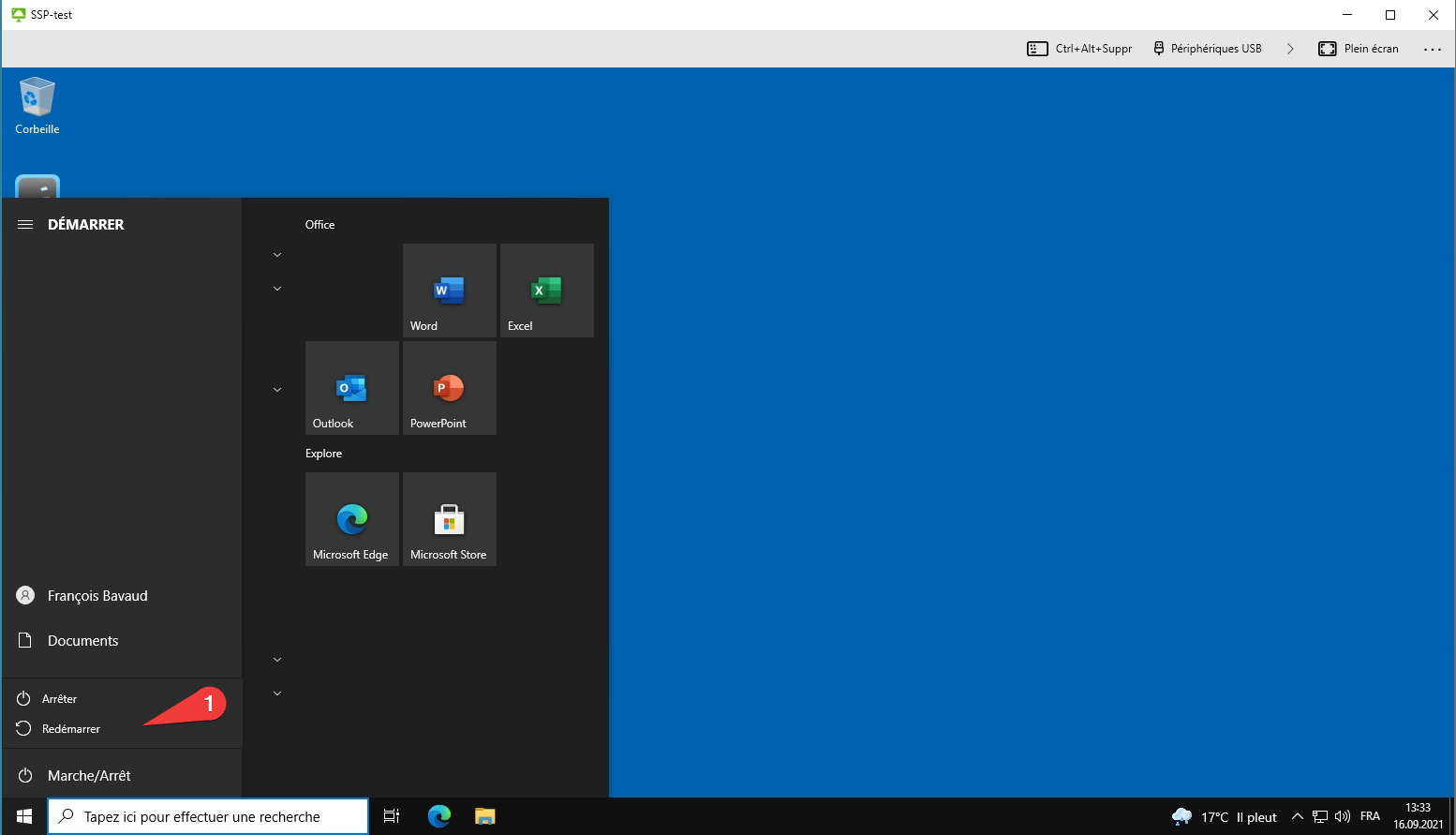
Si vous sélectionnez *Arrêter* ou *Redémarrer*, vous serez déconnecté. La machine virtuelle sera ensuite détruite puis recréée automatiquement. <span style="color: #ff0000;">Toutes vos données seront perdues</span>.

If you select *Shutdown* or *Restart*, you will be disconnected. The virtual machine will then be destroyed and automatically recreated. <span style="color: rgb(224, 62, 45);">All your data will be lost</span>.

[![fermeture2.png](https://wiki.unil.ch/ci/uploads/images/gallery/2021-09/scaled-1680-/fermeture2.png)](https://wiki.unil.ch/ci/uploads/images/gallery/2021-09/fermeture2.png)

### Menu du client Horizon

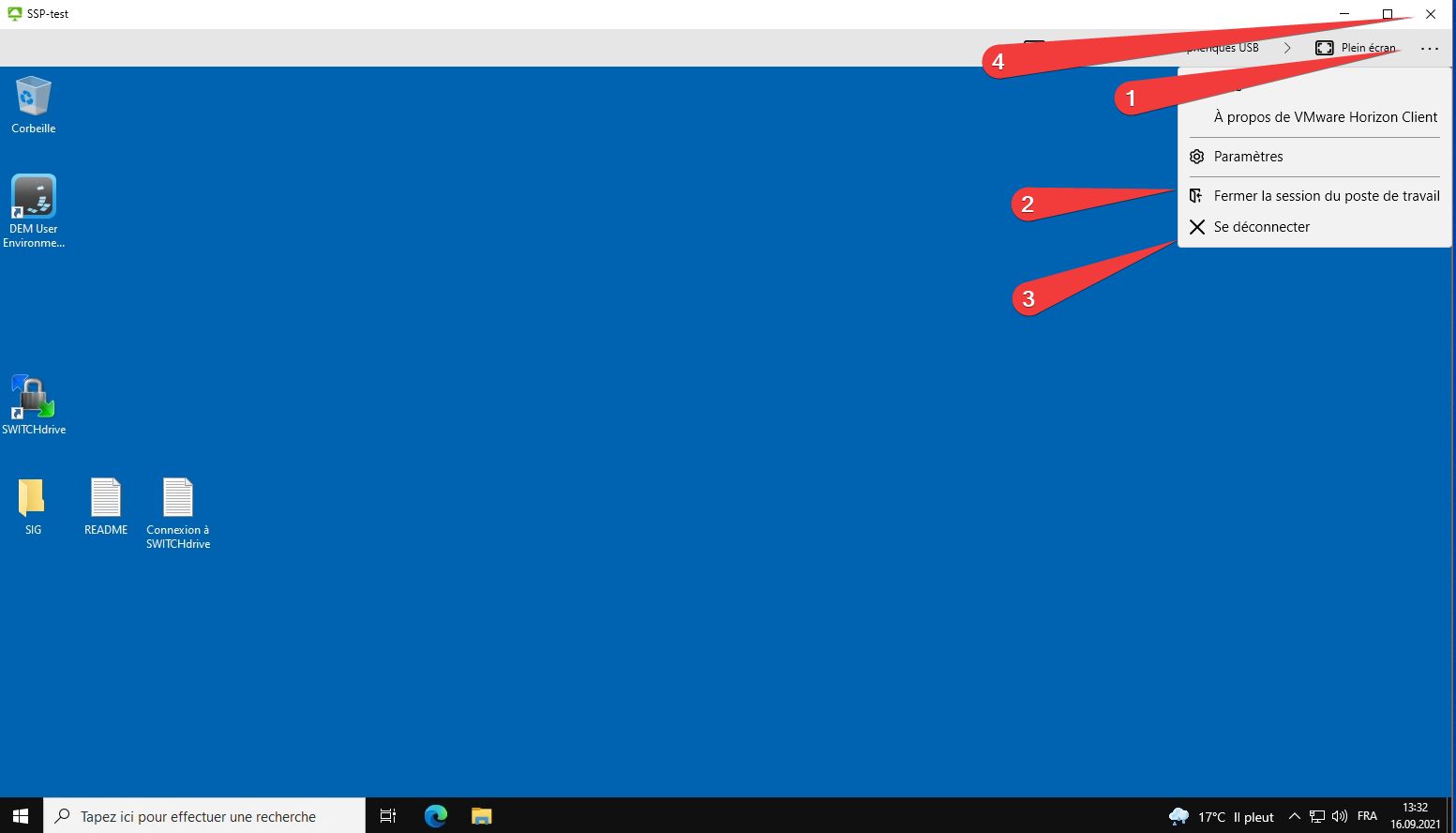
Pour accéder à ces options, cliquez sur "**..."** dans le menu en haut de l'écran (1)*.*

Si vous sélectionnez *Fermer la session du poste de travail (2)*, vous serez déconnecté. La machine virtuelle sera ensuite détruite puis recréée automatiquement. <span style="color: #ff0000;">Toutes vos données seront perdues</span>.

Si vous sélectionnez *Se déconnecter* (3) ou que vous fermez la fenêtre de l'application (4), vous serez déconnecté et votre machine virtuelle sera conservée en l'état pendant trois heures. Elle sera ensuite détruite.

To access these options, click on "..." in the menu at the top of the screen (1).

If you select *Logoff deskotop* (2), you will be logged out. The virtual machine will then be destroyed and automatically recreated. All your data will be lost.

If you select *Disconnect* (3) or close the application (4), you will be logged out and your virtual machine will be kept as is for three hours. Then it will be destroyed.

[![fermeture1.png](https://wiki.unil.ch/ci/uploads/images/gallery/2021-09/scaled-1680-/fermeture1.png)](https://wiki.unil.ch/ci/uploads/images/gallery/2021-09/fermeture1.png)
# Récupérer des données sur sa machine virtuelle

### 1. Dossier partagé

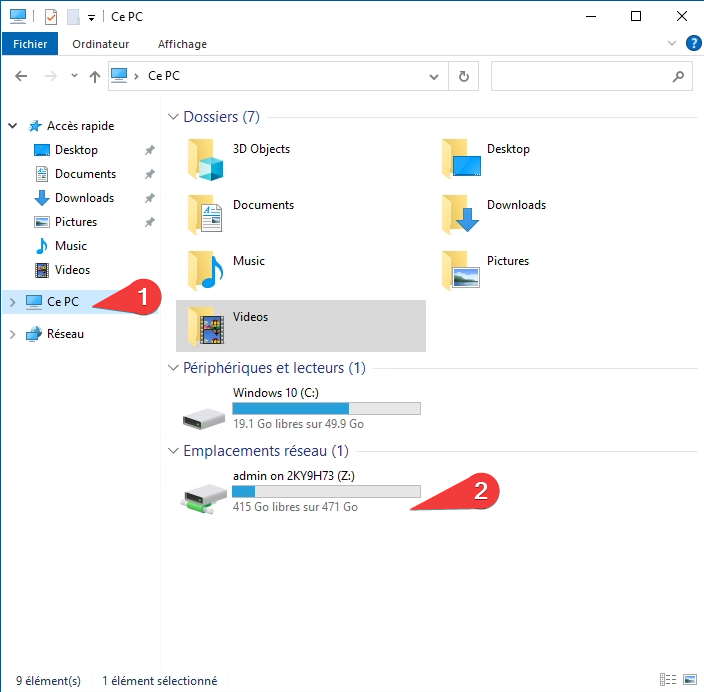
Si vous utilisez l'application *VMware Horizon Client*, la fonctionnalité de lecteur partagé vous permet de transférer des données entre votre ordinateur personnel et la machine virtuelle. Si cette option est activée, vous pouvez accéder en cliquant sur *Ce PC* (1) dans une fenêtre de l'explorateur de fichier Windows. Dans l'exemple ci-dessous, le dossier *admin* est partagé (2)

If you are using the *VMware Horizon Client* application, the shared drive feature allows you to transfer data between your personal computer and the virtual machine. If this option is enabled, you can access it by clicking *This PC* (1) in a Windows File Explorer window. In the example below, the *admin* folder is shared (2)

[![sharefolder3.png](https://wiki.unil.ch/ci/uploads/images/gallery/2021-09/scaled-1680-/sharefolder3.png)](https://wiki.unil.ch/ci/uploads/images/gallery/2021-09/sharefolder3.png).
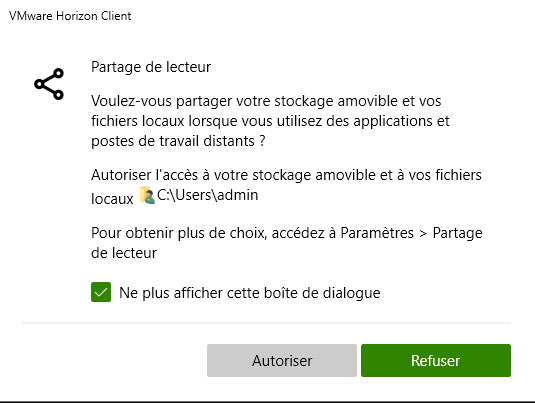
Lors de votre première connexion, l'application vous proposera de connecter le dossier utilisateur de votre ordinateur personnel. Si vous voulez utiliser cette fonctionnalité. cliquez sur *Autoriser*.

The first time you log in, the application will offer you to connect the user folder of your personal computer. If you want to use this feature, click on *Allow*.

[![sharefolder2.png](https://wiki.unil.ch/ci/uploads/images/gallery/2021-09/scaled-1680-/sharefolder2.png)](https://wiki.unil.ch/ci/uploads/images/gallery/2021-09/sharefolder2.png)
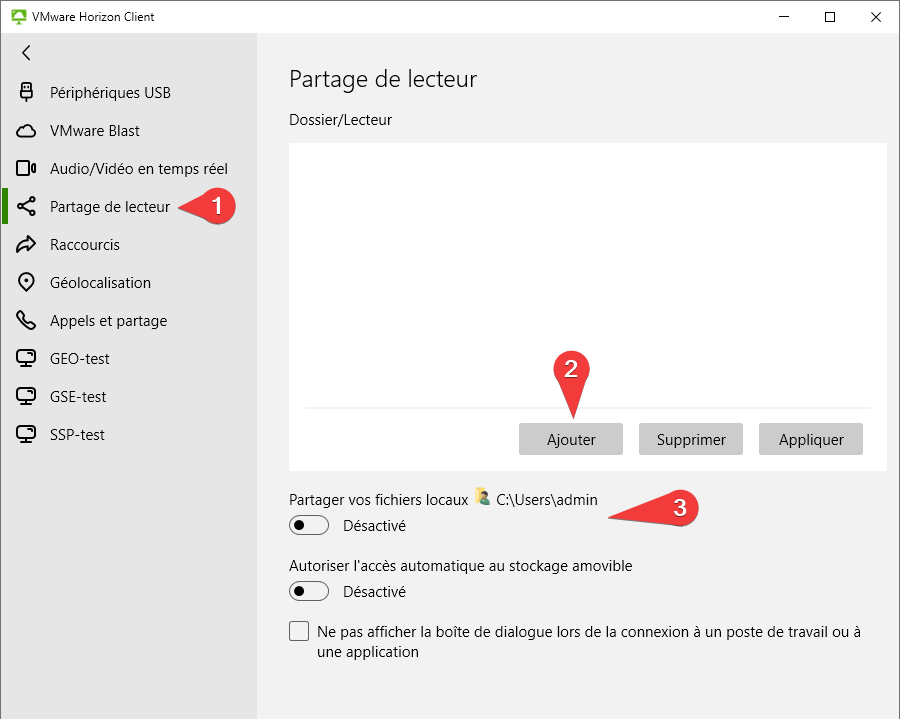
Si vous voulez connecter un autre dossier, ouvrez les paramètres et cliquez sur *Partage de lecteur* (1)à droite. Vous pourrez ensuite cliquer sur *Ajouter* (2) et sélectionner le dossier désiré. Depuis ce menu, vous pouvez aussi activer ou désactiver le partage du dossier utilisateur (3).

If you want to connect another folder, open the settings and click on *Drive and Folder Sharing* (1) on the right. Then you can click on *Add* (2) and select the desired folder. From this menu, you can also enable or disable the user folder's access (3).

[![sharefolder1.png](https://wiki.unil.ch/ci/uploads/images/gallery/2021-09/scaled-1680-/sharefolder1.png)](https://wiki.unil.ch/ci/uploads/images/gallery/2021-09/sharefolder1.png)
### 2. Clef USB ou disque dur externe

Vous pouvez connecter une clef USB ou un disque dur externe à votre ordinateur ou a un ordinateur des salles de cours. Le périphérique sera normalement automatiquement détecté par la machine virtuelle.

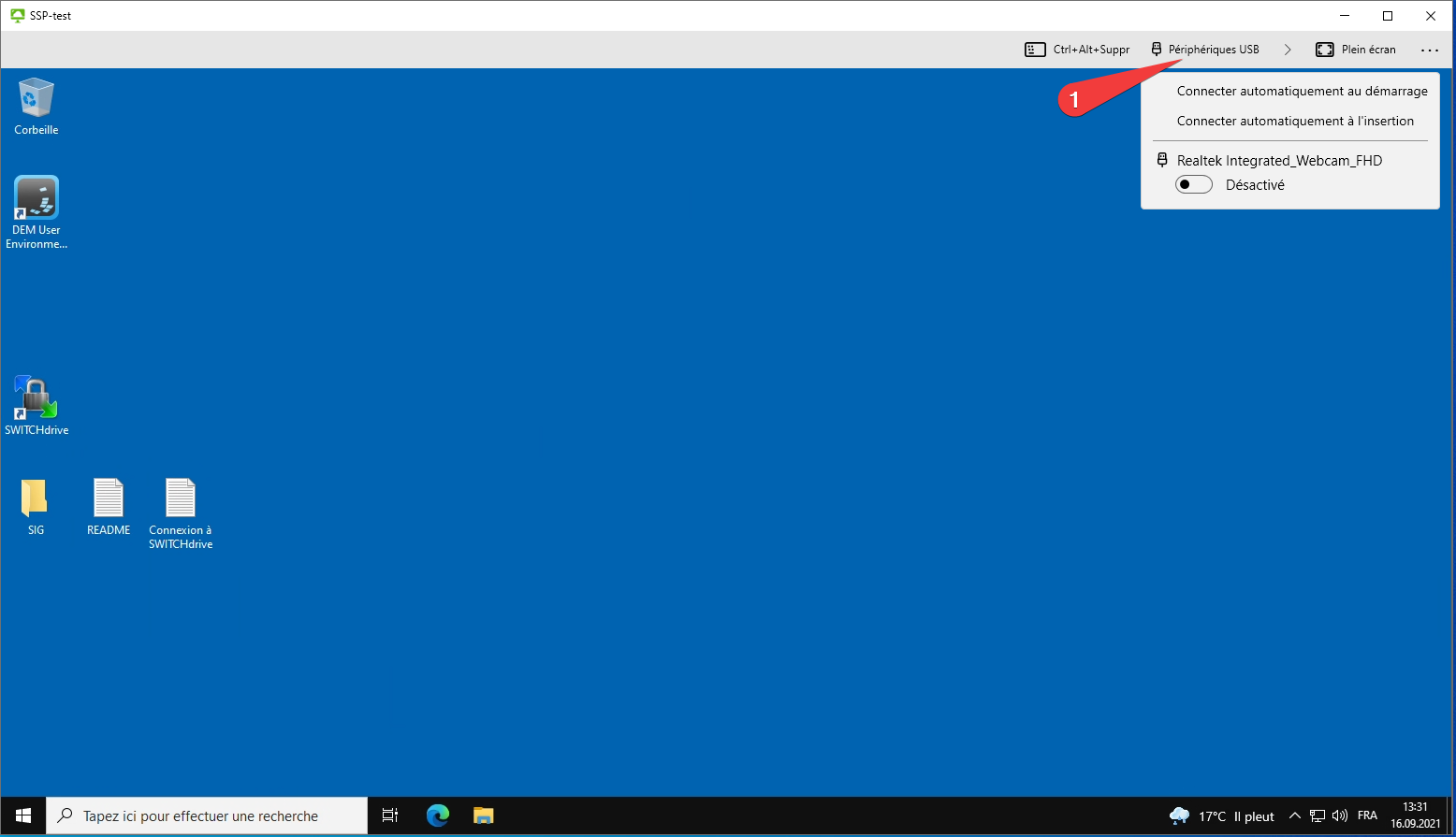
Si ce n'est pas pas le cas, vous pouvez cliquez sur *Périphérique USB* (1) sur le menu en haut de l'écran pour forcer la connection.

You can connect a USB drive or an external hard drive to your computer or to a computer in the classrooms. The device will normally be automatically detected by the virtual machine.

If this is not the case, you can click on *USB Device* (1) on the top menu to force the connection.

[![usb1.png](https://wiki.unil.ch/ci/uploads/images/gallery/2021-09/scaled-1680-/usb1.png)](https://wiki.unil.ch/ci/uploads/images/gallery/2021-09/usb1.png)
### 3. OneDrive

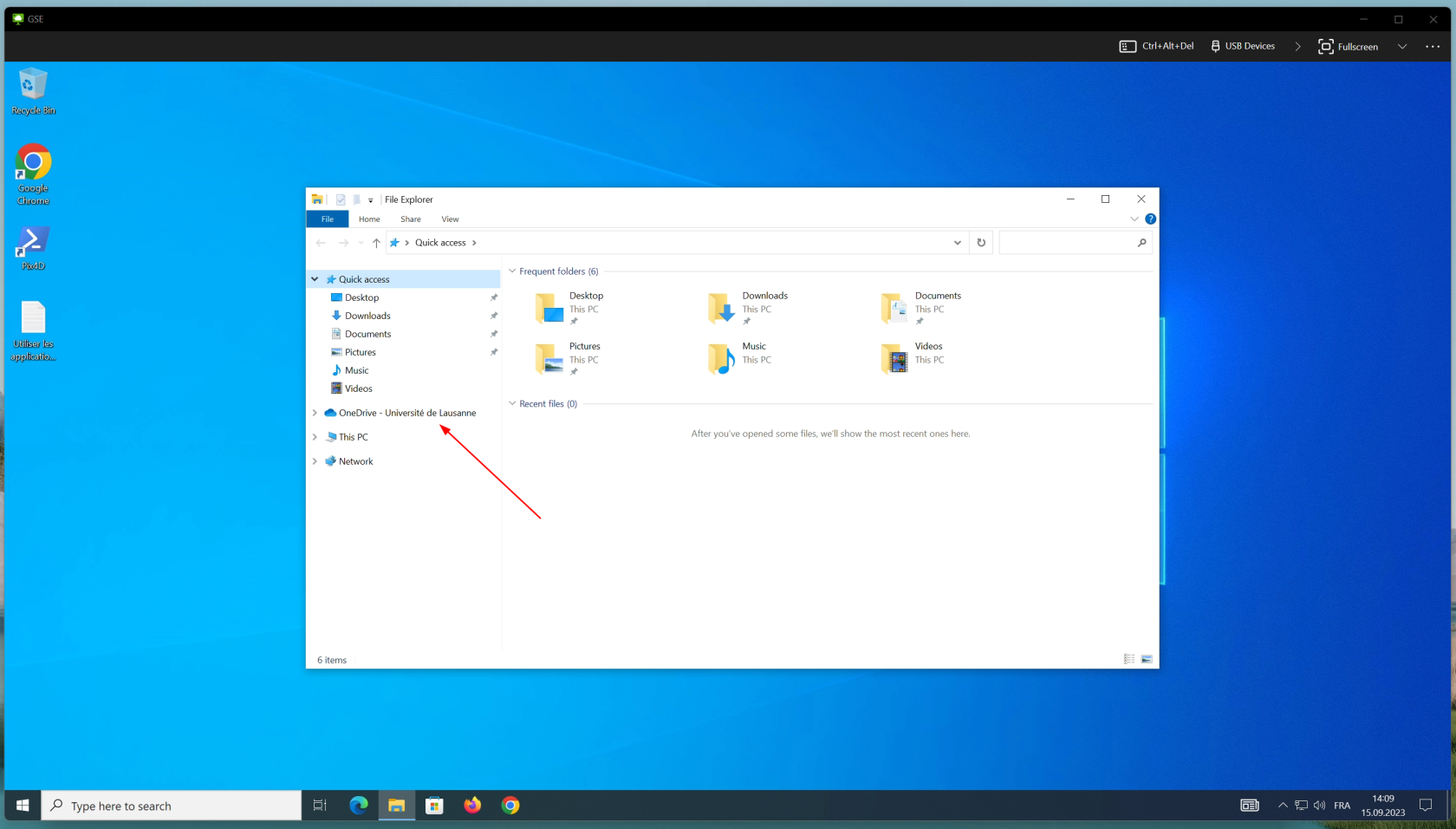
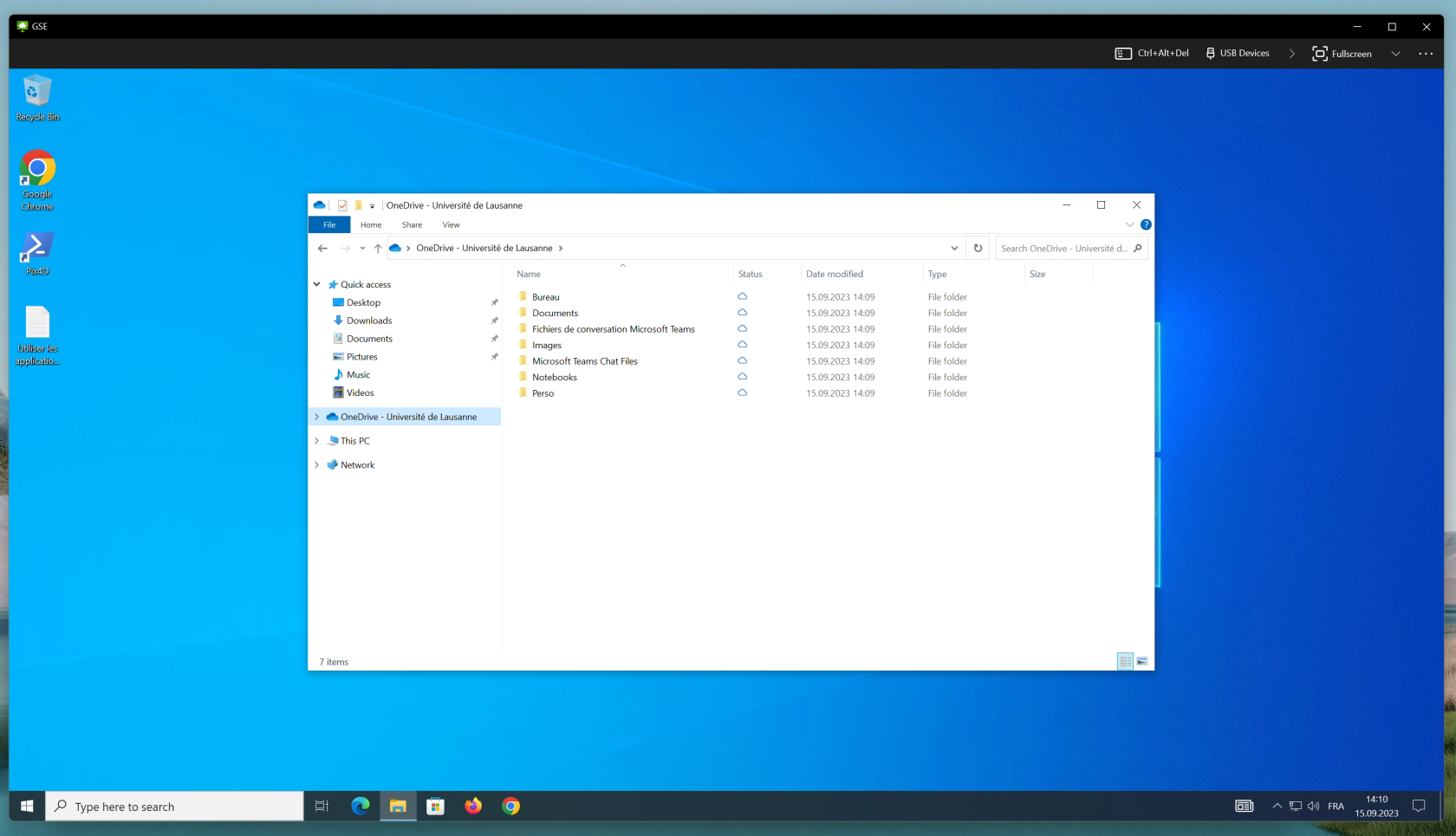
Lors de la connexion à votre session, vous êtes automatiquement connecté à OneDrive et la synchronisation se lance automatiquement. Vous pouvez accéder à vos fichiers depuis l'explorateur Windows.

Notre documentation OneDrive se trouve sur [cette page](https://wiki.unil.ch/ci/books/synchronisation-de-fichiers-onedrive/chapter/doc-publique).

[![OD1_VDI.png](https://wiki.unil.ch/ci/uploads/images/gallery/2023-09/scaled-1680-/od1-vdi.png)](https://wiki.unil.ch/ci/uploads/images/gallery/2023-09/od1-vdi.png)
[![OD2_VDI.png](https://wiki.unil.ch/ci/uploads/images/gallery/2023-09/scaled-1680-/od2-vdi.png)](https://wiki.unil.ch/ci/uploads/images/gallery/2023-09/od2-vdi.png)
# VDI - Change language

By default, the operating system of virtual machines is in French, but it is possible to change it to English.

To do so :

1\. In the Windows start menu, find the *Langue* folder.

2\. Choose *Set language to English.*

3\. The virtual machine will stop and the operating system will be in english at you next logon.

[![laungue1.png](https://wiki.unil.ch/ci/uploads/images/gallery/2021-09/scaled-1680-/laungue1.png)](https://wiki.unil.ch/ci/uploads/images/gallery/2021-09/laungue1.png)

# Utilisation d'ArcGIS

#### Activer sa licence personnelle

1. Cliquer sur "Your ArcGIS organization's URL"  
      
    [![arcgispro_win_00011.png](https://wiki.unil.ch/ci/uploads/images/gallery/2023-03/scaled-1680-/arcgispro-win-00011.png)](https://wiki.unil.ch/ci/uploads/images/gallery/2023-03/arcgispro-win-00011.png)
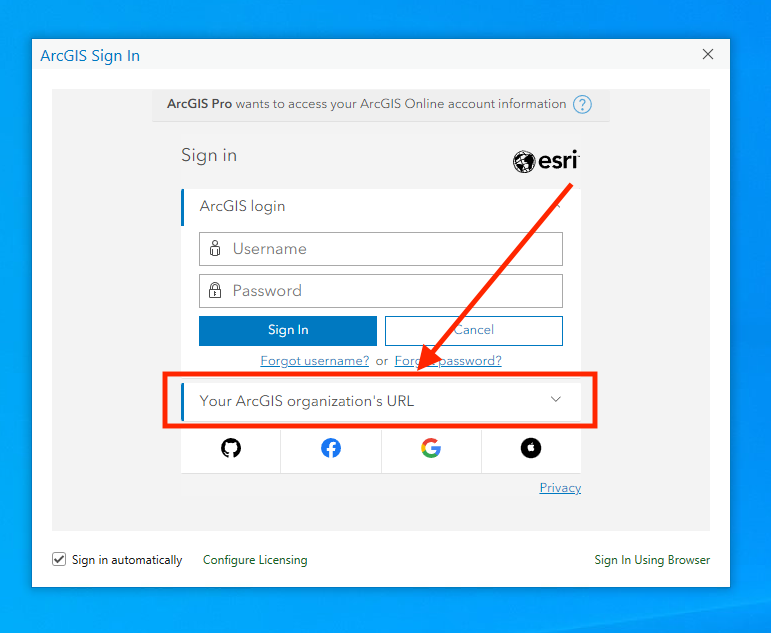
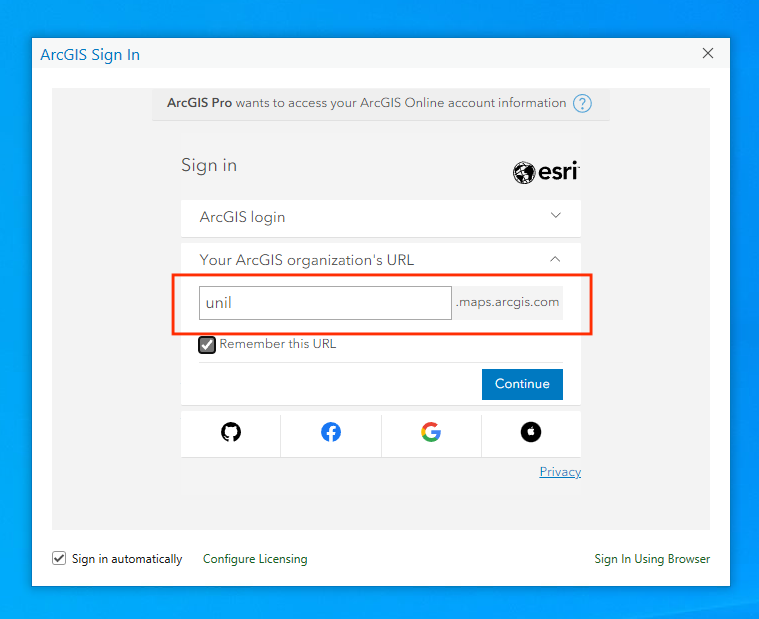
2. Compléter l'URL en ajoutant "unil" =&gt; unil.maps.arcgis.com  
      
    [![arcgispro_win_00012.png](https://wiki.unil.ch/ci/uploads/images/gallery/2023-03/scaled-1680-/arcgispro-win-00012.png)](https://wiki.unil.ch/ci/uploads/images/gallery/2023-03/arcgispro-win-00012.png)
3. Cliquer sur Switch edu-ID UNIL et s'authentifier avec son compte edu-ID  
      
    [![arcgispro_win_00013.png](https://wiki.unil.ch/ci/uploads/images/gallery/2023-03/scaled-1680-/arcgispro-win-00013.png)](https://wiki.unil.ch/ci/uploads/images/gallery/2023-03/arcgispro-win-00013.png)
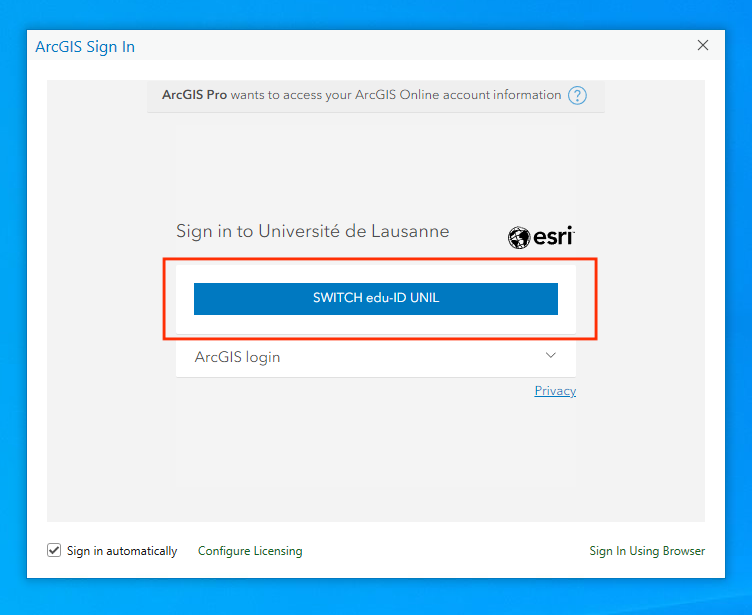
4. La licence est alors attribuée.