# Downloading Data from the Website

- To download your data if you don't have the SWITCHdrive desktop application, you can visit the [service's website](https://drive.switch.ch/).
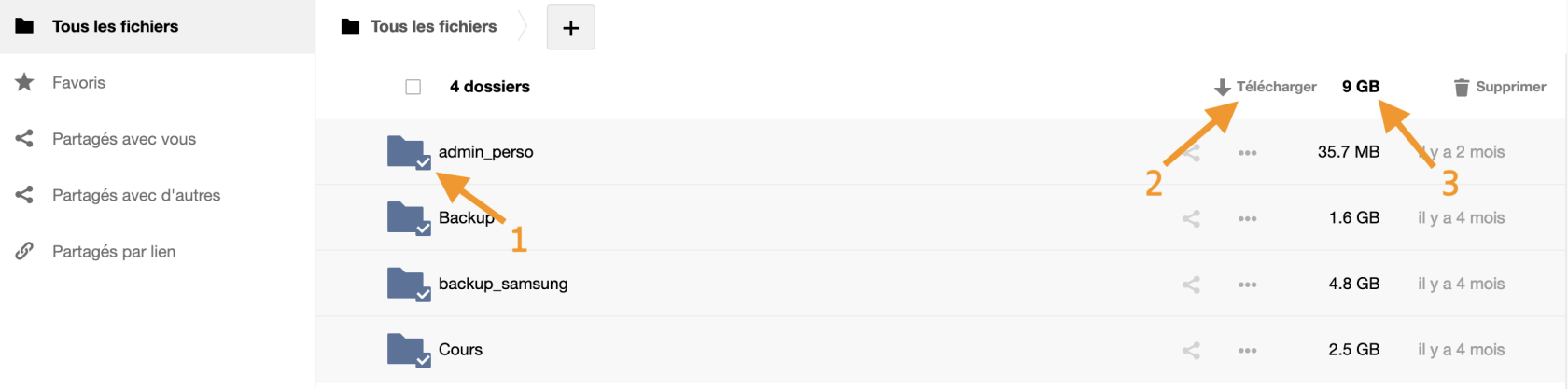
- Select the folders you want to retrieve by clicking on the small checkbox next to the icon <span style="color: rgb(230, 126, 35);">(1)</span>.
- Click on the *Download* button at the top of the page <span style="color: rgb(230, 126, 35);">(2)</span>.

<p class="callout warning">Make sure to observe the total size of the data you are about to download <span style="color: rgb(230, 126, 35);">(3)</span>. <span style="color: rgb(0, 0, 0);">The download time can be quite long, and interrupting the process may cause issues. Try to break down the download by selecting only a portion of the folders.</span></p>

[![downloadSWITCHdrive.png](https://wiki.unil.ch/ci/uploads/images/gallery/2023-06/scaled-1680-/downloadswitchdrive.png)](https://wiki.unil.ch/ci/uploads/images/gallery/2023-06/downloadswitchdrive.png)