# Advanced features
# What to do with the newly created entries in SERVAL (created entries email)
##### **What to do after receiving the email "new record created in SERVAL"** | Review, edit, and publish a notice linked to the account.
# Link yourself with an already existing entry
##### **How to link a publication in SERVAL to your account**
Follow this tutorial to link yourself to a publication in SERVAL that belongs to you but where your identifier does not appear in the "Links" column.
# My DOCX report (or SNSF report)
###
###
#### **Aim**
The “**My DOCX Report**” functionality allows individuals attached to a research unit to create a DOCX document with its list of publications in the format formerly required by the SNSF before the [new narrative CV](https://www.snf.ch/en/gKcnwW6aEft4bMPF/page/your-curriculum-vitae-all-about-the-cv-format) came into force.
#### **
Structure**
The structure of the report follows the former SNSF recommendations. However, the information contained in Serval allows the first 4 sections to be completed. **Authors are required to complete, if applicable, the other 5 sections or to eliminate them.**
####
**Format**
Aware that each discipline has specific bibliographical style habits for publication lists, “My DOCX report” **is a .docx document that can be freely modified by the user**.
The bibliographic style used corresponds to that indicated by the SNSF as the most easily readable when evaluating requests:
\[author\]\[year\]\[title\]\[Journal or book\]\[Edition\]\[Pages\]\[DOI\]\[Link to full text\]
To define the styles for each type of publication, we based ourselves on the style of the Fribourg University of Teacher Education in the open library Citation Styles Library because of its similarity to the model recommended by the SNSF.
####
**Omissions or errors**
Some publications may not be imported into the report. This is probably due to the fact that the data contained in Serval are incomplete or incorrect.
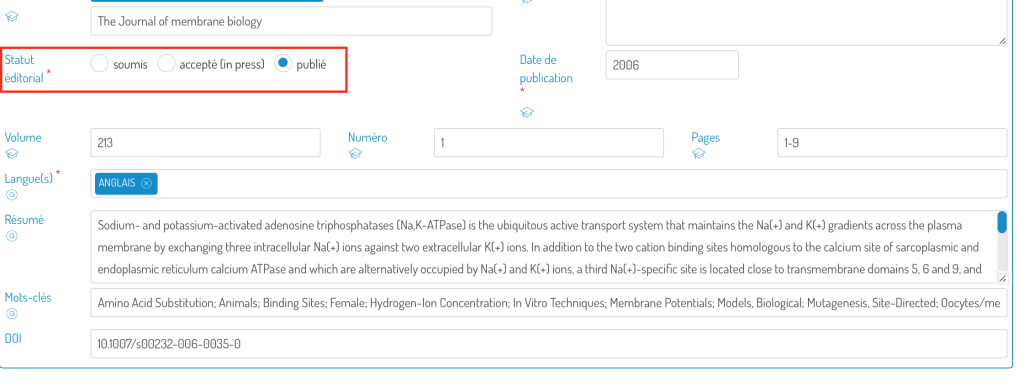
The functionality recalls publications in the public domain (there is no longer a limit to the last 5 years):

With editorial status in press or published:
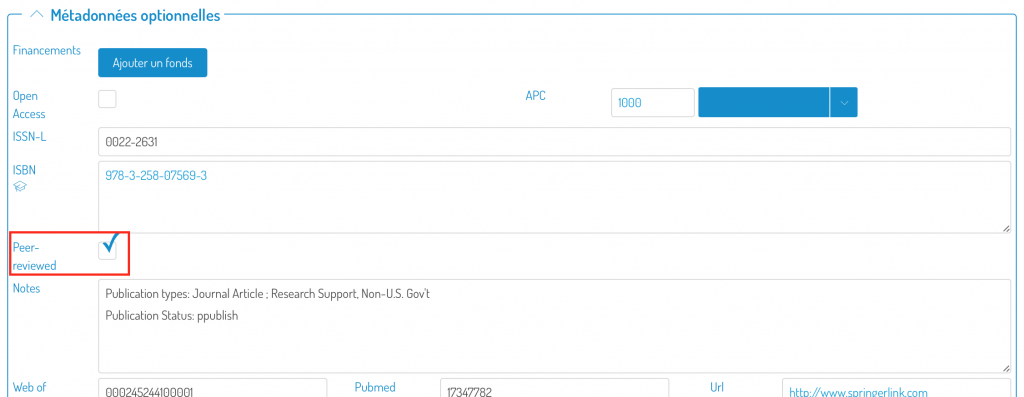
And with the “**peer-reviewed**” box checked (Optional metadata):
If you have any doubts about how to edit the record, [follow this link](https://wp.unil.ch/infoserval/archives/1497?lang=en) to find text and video help on the subject.
#### **Edit your report**
The.docx document generated with this feature can be completely edited. [Watch the video ](https://www.youtube.com/watch?v=sHgyir1By7A&feature=youtu.be)to learn in a few minutes what you can do with your report.