# Main Page | Intranet
#### **Main Page Navigation Guide** | Intranet
[](https://wiki.unil.ch/recherche/uploads/images/gallery/2024-02/intranet1-serval.png)
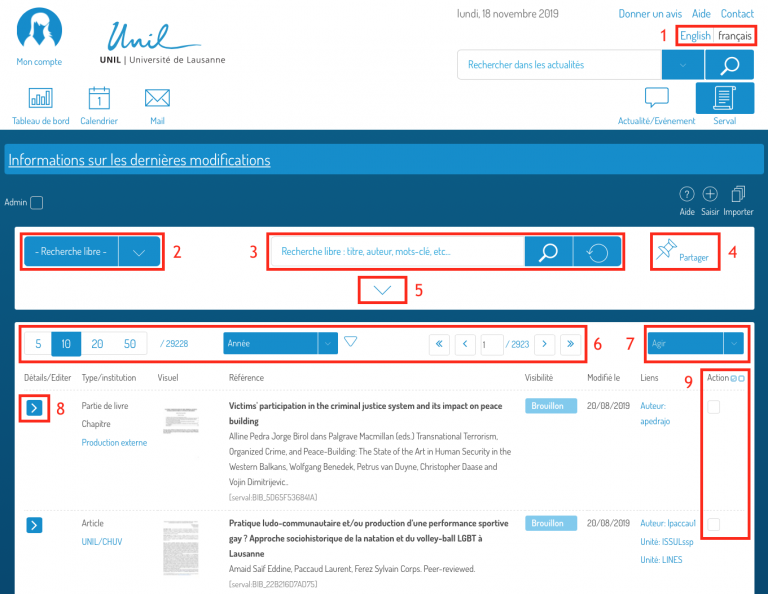
1. **Language** **Selection**
2. **Proposed search criteria**, for example, publications with documents.
3. **Search field**. The *magnifying glass* button launches the search. The right button (circular arrow) resets the fields.
4. **Generate a shareable link** leading to the results of selected search criteria.
5. To **Show/Hide advanced search**, click on the surrounded icon.
6. You have the option to **Sort your search** based on various criteria (latest modification, relevance, year, etc.). Select the desired filter. The triangle on the right indicates the sorting order, which you can reverse by clicking on it. You can also choose the number of notices visible on the page.
7. Perform actions such as **Exporting the results** of checked searches (see 9).
8. Click on this icon to **Show/Hide details** about the publication and to **edit the notice**.
9. **Select the publications** on which to perform an action (see 7).