
RSS and Atom feeds
RSS (for Really Simple Syndication) is a tool that allows you to stay informed of what's new on a website, without having to visit it.
It's a format that indicates what has changed or been added, clearly and automatically. Atom works in the same way, with a few technical differences. These formats are mainly used to easily track updates to blogs, news sites or podcasts.
How do I use an RSS/Atom feed ?
To read and follow an RSS/Atom feed, you need a feed reader, also known as an aggregator. The following are just a few of the tools available :
- on the computer or mobile Feedly , Inoreader or The Old Reader
- Browser extensions: RSS subscription extension by Google for Chrome
How do I subscribe to a feed ?
- Find the URL of the RSS/Atom feed : on a site, look for an orange RSS icon
 or a link with the word “RSS” or “Atom”. The URL often ends with .xml, /feed, /rss, etc. Example for a WordPress site : https://wp.unil.ch/newsci/feed
 - Add the feed to your reader : copy and paste the URL into your application/feed reader
- You'll then see the list of new articles automatically updated

How do I subscribe to Unil’s news and events feeds?
- For news, go to the Unil news page
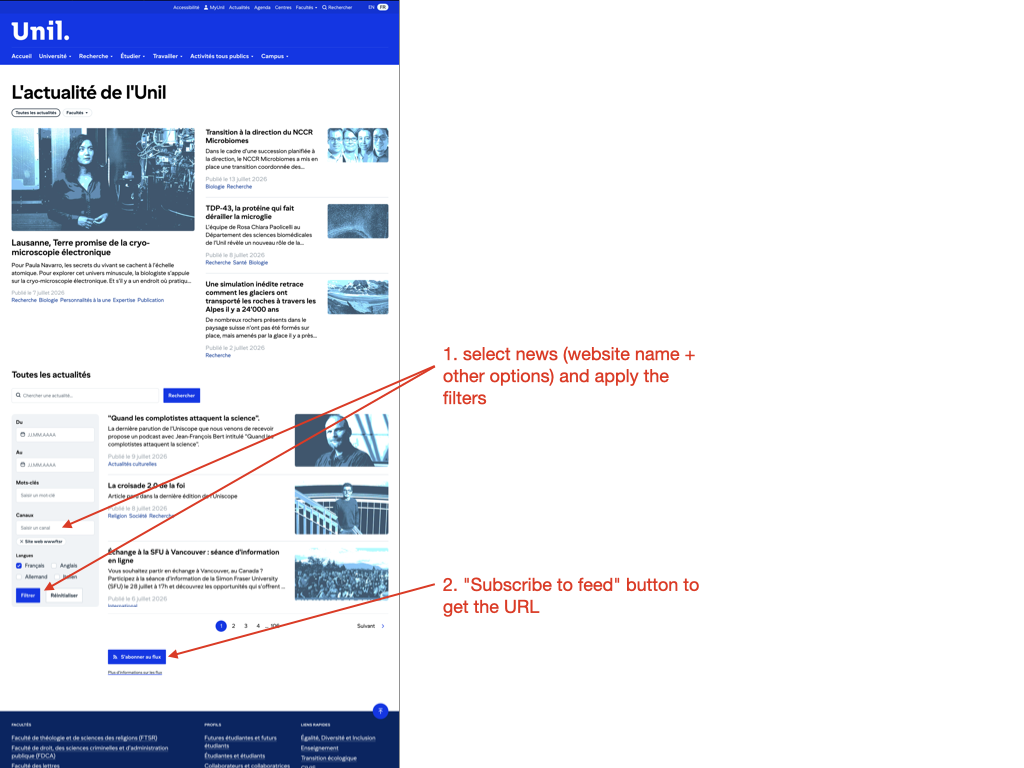
- Select the news items you want using the filters (site name, optional dates, etc.) as shown below
- Then click on the "Subscribe to feed" button at the bottom of the page to copy the feed URL
- For events, go to the events at Unil page and repeat the steps above
Advantages of RSS/Atom feeds :
- They enable you to centralize information from several sites in one place
- They are generally free of advertising or tracking (depending on the reader used)
- In some cases, they can be a simple replacement for a newsletter, and the person who visits a site and subscribes to its RSS/Atom feed does not need to provide their email address or personal details in order to do so.
- They are very practical for journalists, researchers and anyone interested in monitoring information or technology in a wide range of fields.