
DCSR - Exposing a web service to the Internet
Exposing a web service to the Internet
Who this page is for — the PI and the technical administrator of a VM hosted by DCSR who want to make a web service reachable from the Internet. French version: Exposer un service web sur Internet.
1. In short
| Question | Answer |
|---|---|
| Which ports can be exposed? | TCP/80 and TCP/443 only. No other port (SSH, 8080, databases, ...) is allowed. |
| Which path does the traffic take? | Internet → UNIL firewall (FWaaS) → F5 load balancer → your VM. |
| Who provides the public certificate? | DI. It is installed and renewed automatically on the F5, not on your VM. |
| What changes on my VM? | It is migrated to a dedicated VLAN and switched to a fixed internal IP (the IP changes). |
| What do I have to do? | Harden the web service, fix the vulnerabilities found by the scan, and keep that level over time. |
2. How a visitor reaches your VM
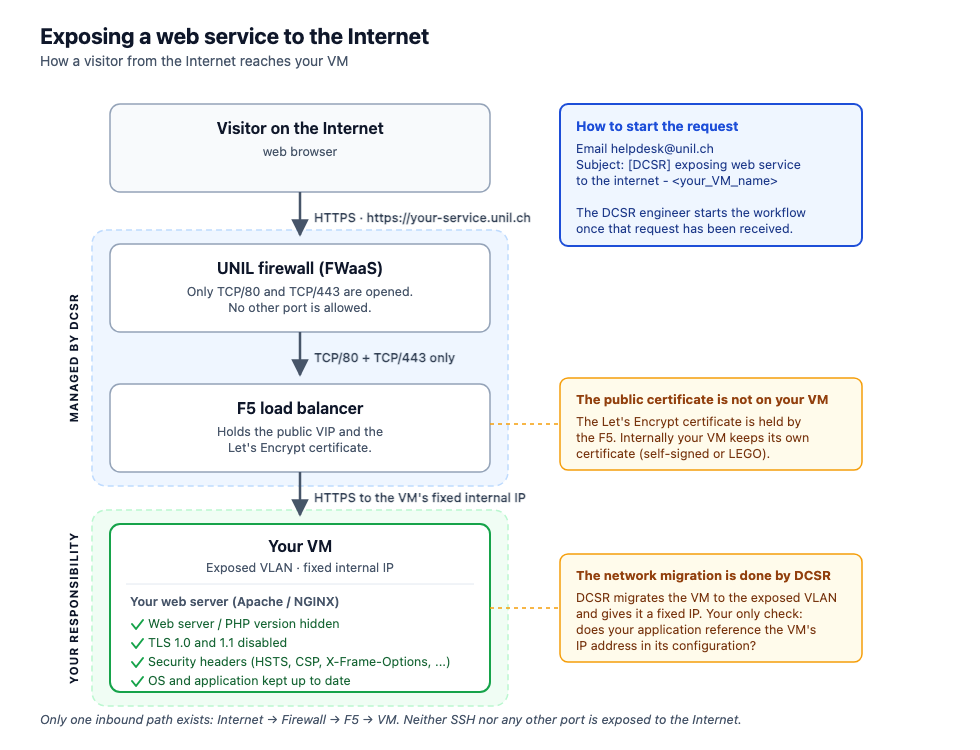
The key point: two components are not yours (the firewall and the F5, managed by DI and DCSR), and one is your responsibility — your VM and the web service running on it. The security level of the whole chain is the security level of your VM.
3. Prerequisites before requesting
- The web service works and has been tested inside the UNIL network (including HTTPS).
- The VM is up to date (OS + application).
- A technical administrator is identified and available throughout the procedure.
- The PI is identified: they will fill in the FWaaS form.
- The desired public URL has been chosen:
xx.unil.chorxx.dcsr.unil.ch. - You know which configurations will need updating when the internal IP changes.
4. What going public means for your VM
Your internal IP changes. The VM is migrated to the exposed VLAN and switched to a fixed IP. On your side, update: application configurations, ACLs and allow-lists, scheduled jobs, internal DNS entries, network mounts, and any third-party declaration of the IP.
Agents are installed. Monitoring (Prometheus) and vulnerability scanning (Nessus/Tenable agent). The VM is also attached to the managing AD and AWX groups.
Your VM becomes a target. It is scanned from the outside, and will keep being scanned. A critical vulnerability found after going public must be fixed — if necessary by temporarily removing public access.
5. Who does what
| Actor | Role |
|---|---|
| DCSR research engineer | Opens the tracking issue, coordinates, validates final access with you. |
| Researcher / VM administrator | Web service hardening, vulnerability remediation, functional testing. |
| DCSR (network/security) | Internal IP and DNS reservation, VLAN migration, fixed IP, agents, Nessus/Tenable scan, header check. |
| PI | Fills in the FWaaS form (port opening request). |
| DI-RSX | Public DNS, F5 VIP, F5 and firewall configuration, Let's Encrypt certificate. |
6. Security requirements on your side
These four points cause most of the back-and-forth. Handling them before the scan saves several days.
a) Hide the web server and PHP version
- Apache: hide the version
- NGINX: hide the version
- Check:
curl -I https://your-service.dcsr.unil.ch
b) Disable TLS 1.0 and TLS 1.1 — only TLS 1.2 and 1.3 are accepted.
c) Set the security headers
| Header | Purpose |
|---|---|
Strict-Transport-Security |
Forces HTTPS on subsequent visits. |
X-Frame-Options |
Prevents your site being embedded in a third-party iframe. |
X-Content-Type-Options |
Prevents MIME type sniffing. |
Referrer-Policy |
Limits the information sent to third-party sites. |
Permissions-Policy |
Restricts access to browser APIs (camera, microphone, ...). |
Content-Security-Policy |
Limits allowed content sources (as far as feasible). |
Check: securityheaders.com (tick the hide option so the result is not published).
d) Fix the vulnerabilities found by the scan — DCSR runs a Nessus/Tenable scan. You receive the report and fix what is identified, with the support of your DCSR engineer. A disputed vulnerability that is hard to fix can be escalated to the security team for a decision.
7. SSL certificates
| Context | Certificate |
|---|---|
| Before going public (UNIL internal) | Self-signed certificate on the VM, or Let's Encrypt via LEGO. |
| After going public | Let's Encrypt certificate issued by DI and held by the F5. Your VM manages nothing on the public side. |
Procedures: Self-signed (NGINX) · Self-signed (Apache) · Let's Encrypt / LEGO
8. How the request unfolds
Tracking happens in a GitHub issue opened by your DCSR engineer (template VM (Going public) Production Issue Template). You can follow progress there.
| Phase | What happens | What is expected from you |
|---|---|---|
| 1. Preparation | Issue opened, internal IP/DNS reservation, documentation. | Confirm the desired public URL. |
| 2. Network compliance | VLAN migration, switch to fixed IP, agent installation, AD/AWX attachment. | Update your configurations for the new IP and re-validate the service. |
| 3. Hardening | — | Hide versions, disable TLS 1.0/1.1, set the headers. |
| 4. Security scan | Nessus/Tenable scan and analysis. | Fix the identified vulnerabilities. |
| 5. Public opening | Public DNS, F5 VIP and configuration, firewall opening. | The PI fills in the FWaaS form. |
| 6. Validation | Header verification, access test. | Confirm the service works from the Internet. |
Phases 5 and 6 depend on DI-RSX (Otobo ticket): expect a delay that is outside both your control and DCSR's.
9. The FWaaS form
Filled in by the PI: Firewall as a Service.
- Requested ports: TCP/80 and TCP/443 only.
- Field DNS name of the destination server: the chosen public URL — it must be valid at the time of the request.
- Field Comment: give the VM name and its internal IP.
The form automatically creates an Otobo ticket handled by the DI-RSX team.
10. After going public
- Keep the security level up: OS and application updates, follow up on periodic re-scans.
- New vulnerability found? Contact your DCSR engineer; depending on severity, public access may be suspended until it is fixed.
- Changing the public URL: requires a new FWaaS request and new F5 configuration.
- Need a WAF (application protection on the F5): possible, request it through your DCSR engineer.
- End of service life: request decommissioning so that public exposure and DNS entries are removed cleanly.
11. FAQ
Can I expose another port (SSH, 8080, a database)? No. Only TCP/80 and TCP/443 can be exposed. For administrative access or a non-web protocol, use the UNIL VPN or an internal jump host.
How long does the procedure take? The DCSR part is quick; the real delays come from hardening/remediation on your side and from DI-RSX processing the FWaaS ticket.
My service handles sensitive data. Say so when the issue is opened: those VMs are tracked separately and public exposure is not always the right answer.
My service does not need to be public, only reachable from off campus. The UNIL VPN covers that without any Internet exposure — often the better option.
Who do I contact? Your DCSR research engineer.